General discussion related to Cable Modems, DSL, Wireless, Fiber, Mobile Networks, Wireless ISPs, Satellite, or any other type of high-speed Internet connection, general issues and questions here. Review and discuss ISPs as well (AT&T / SBC, BellSouth, Bright House, CableOne, Charter, Comcast, Covad, Cox, Cablevision / Optimum Online, TMobile, Verizon FIOS, Shaw, Telus, Starlink, etc.)
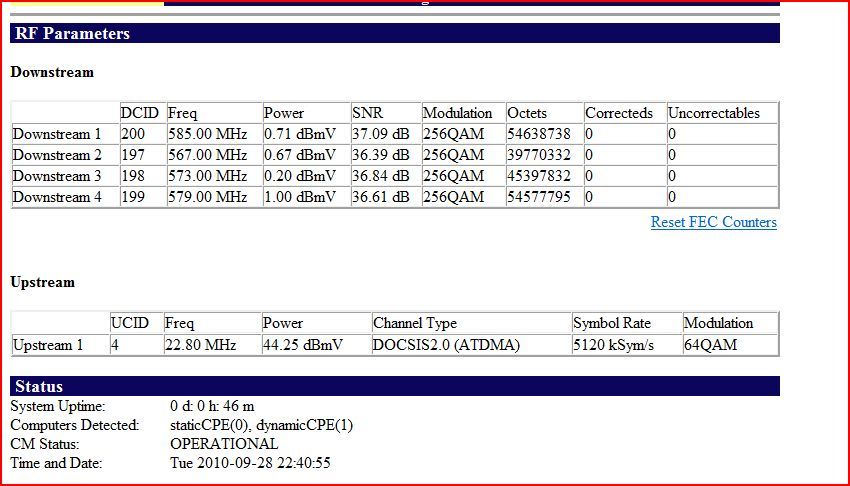
I had to put the modem in my room instead of where it used to be connected at and I am wondering if I should get some cable from Comcast and run a new line for it?
I don't know what the levels on this new Modem are supposed to be.
Any links on where i can learn more about this style off connection and teh proper levels would be greatly appreciated.
Thanks. It looks like I am about perfect. I am wondering though why I show up as DOCSIS 2.0 upstream when the information I read about my speed Tier says I am supposed to be DOCSIS 3.0