I have had trouble watching You-Tube videos for some time. Ever so ofter a pop up appears with Google blaming TWC for poor broadband service claiming the bandwidth is insufficient. I have 30MB/s and I can confirm that since I run a bandwidth monitoring program all the time (Bit Meter).
Watching the 'stream' if you can call it that looks more like a 'dribble' where 'bursts' show every few second instead of a regular 'stream'. Anyone else get these popups with the same 'studding' problem, or worse yet a black screen with no video??
You Tube & Time Warner Broadband

-
videobruce
- Member
- Posts: 29
- Joined: Wed Mar 01, 2017 7:00 pm
-
videobruce
- Member
- Posts: 29
- Joined: Wed Mar 01, 2017 7:00 pm
Other than the 'Tower' I use (PC), the only devices that 'consume' anything are two TiVo DVR's that only download Guide data one or twice a day and that is very little (just data) for periods of minutes.
There only the two of us, no kids with vidiot games etc chocking bandwidth.
If it is getting consumed by "something else" it isn't here, then it's before it gets here. The message Google puts up blames TWC.
There only the two of us, no kids with vidiot games etc chocking bandwidth.
If it is getting consumed by "something else" it isn't here, then it's before it gets here. The message Google puts up blames TWC.
I am not sure abut your way of monitoring, I am not familiar with that "Bit Meter" and what it measures other than the total consumed gigabytes.
If you are getting choppy YouTube/streaming, I suggest that you test your speeds from a distant server using speedtest.net or comparable web-based service. They should not be choppy with any speed over ~3Mbps. Most likely, it is a problem with your internet connection that should be addressed by TWC. It is also possible that it is something with your local connection, i.e. Wi-Fi issues, etc.
If you are getting choppy YouTube/streaming, I suggest that you test your speeds from a distant server using speedtest.net or comparable web-based service. They should not be choppy with any speed over ~3Mbps. Most likely, it is a problem with your internet connection that should be addressed by TWC. It is also possible that it is something with your local connection, i.e. Wi-Fi issues, etc.
-
videobruce
- Member
- Posts: 29
- Joined: Wed Mar 01, 2017 7:00 pm
Cat5 to everything except a Laptop that is rarely used.
BitMeter & DU Meter are very similar (there are others), but those seem to be the most popular. I have used one or the other for well over 10 years (1st DU Meter, then BitMeter). I always have it running.
https://codebox.net/pages/bitmeter2
http://www.hageltech.com/dumeter/about
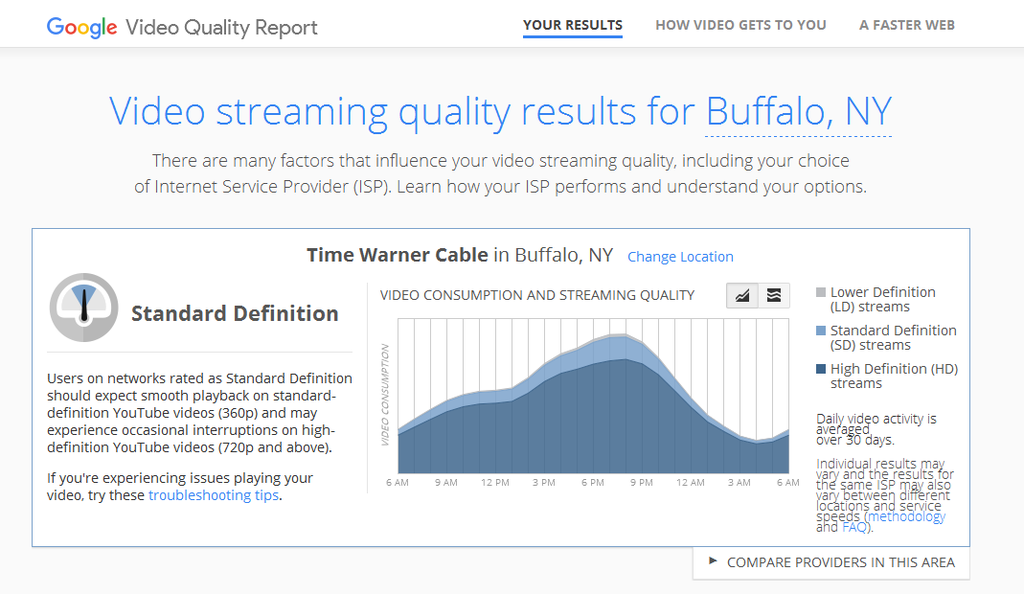
Google has a "Video Quality Report, they claim it's TWC; but take a look at a typical U-Tube video transfer rate during live viewing;
https://www.google.com/get/videoquality ... fgVleiGFmM
The 1st is the interruptions message, the 2nd & 3rd are the results according to Google, the 4th is a trpical live view xfer rate (notice the 'sputts', the last is a maxed out download that shows 37MB/s on a 30MB/s service.
 [/IMG]
 [/IMG]
 [/IMG]
 [/IMG]
BitMeter & DU Meter are very similar (there are others), but those seem to be the most popular. I have used one or the other for well over 10 years (1st DU Meter, then BitMeter). I always have it running.
https://codebox.net/pages/bitmeter2
http://www.hageltech.com/dumeter/about
Google has a "Video Quality Report, they claim it's TWC; but take a look at a typical U-Tube video transfer rate during live viewing;
https://www.google.com/get/videoquality ... fgVleiGFmM
The 1st is the interruptions message, the 2nd & 3rd are the results according to Google, the 4th is a trpical live view xfer rate (notice the 'sputts', the last is a maxed out download that shows 37MB/s on a 30MB/s service.
[/IMG][/IMG] [/IMG][/IMG]