Sorry this is long but I wanted to give as much info as possible:
Here is our setup:
We have static ip addresses and the modem is in the bridged mode.
We have only 3 devices on the network:
1. Computer A with a web server and a dns server running Windows 10 pro.
2. Computer B with a web server, dns secondary server, an email server and our POS credit card processor running Windows 10 pro.
3. A netgear wireless router providing wireless to customers
Last week we moved from DSL to Comcast cable. Since the cable was installed we have an issue where the modem will reboot randomly. Sometimes two or three times an hour, other times it may go several hours before rebooting.
We never had this issue with the DSL and the computers we had with DSL have not changed.
Comcast has changed the modem (Cisco DPC3941B) and tested the line thoroughly. Our upstream and downstream levels are perfect and they have not fluxuated for the entire time.
Our building has several other Comcast customers and Comcast techs have monitored them and us at the same time and none of them go down when ours reboots.
After ruling out the cable and modem as an issue, the next thing we did is look at our machines.
We removed the netgear wireless router but the reboot still occurred.
Next, leaving the wireless router off, we removed Computer A, and soon the reboot again occurred.
Next, leaving both the wireless router and Comptuer A off the network, we removed Computer B and waited. After 5 hours there was no reboot.
Based on this we concluded that Computer B is having an issue with the modem.
On Machine B is we shut down the POS and kept if off during testing. We then disabled the Web server, DNS server, and Mail server the reboots seem to stop (we give 5 hours for a test as this is the longest we have gone without reboot since the beginning)
We then try turning on the mail server (only), and soon a reboot.
We disable the mail server and turn on the DNS server (only) and soon a reboot.
We disable the DNS server and turn on the email server (only) and soon a reboot.
No matter which server runs (alone) the reboots begin again.
We have scanned the machine for virus, malware and rootkit (as we do very often) and it is clean.
We have disconnected the ethernet and connected via wireless to the modem with the same result, so a faulty nic card has been ruled out.
Comcast has sent techs out 6 times in the 8 days we have had their service and they cannot find the problem.
One tech suggested "maybe it is a DOS attack", so we set the network monitor on and waited for an attack and the network usage was unchanged immediately before a
reboot. Also it seems unlikely that an attack would reboot the modem, the modem logs only show the modem getting its address after it powers up again. No other info is in the modem logs.
Can anyone suggest ideas on how to isolate this problem? Again the same equipment functioned over DSL without any issues for years.
Although Comcast seems to be doing all they can (tech sat in my office for several hours Saturday morning as we monitored and tried different things unsuccessfully), we obviously cannot functions with random 5 minute drops throughout the day. We process our credit cards the internet and when it goes down we are out of business until it comes back up.
All help is greatly welcome and appreciated.
Cable Modem randomly reboots

Thank you for your reply.Philip wrote:Just a wild guess, but It could be some type of DOS protection at Comcast being triggered by many DNS requests ?
This is a good thought and I will ask the tech to check this.
This makes me wonder if it is typical DOS protection to issue a reboot command rather then just a block. Reboot seems drastic and potentially damaging to equipment?
Also the reboot occurs when the dns server is shut down, so in that case it would not be a factor.
Have you tried moving the modem(s) away from possible sources of EMI (power supplies, routers, firewalls, fluorescent lighting, etc.) ?
Most modems keep some type of log accessible through the web interface that may eventually give a clue as to what is happening ? Do the signal levels fluctuate much, or do they remain the same around the time of the reboots ?
Most modems keep some type of log accessible through the web interface that may eventually give a clue as to what is happening ? Do the signal levels fluctuate much, or do they remain the same around the time of the reboots ?
We have pulled the modem out an it is sitting all by itself at least 2 feet from anything else. We put a fan on it as well just to make sure it is not a overheating issue.Philip wrote:Have you tried moving the modem(s) away from possible sources of EMI (power supplies, routers, firewalls, fluorescent lighting, etc.) ?
Most modems keep some type of log accessible through the web interface that may eventually give a clue as to what is happening ? Do the signal levels fluctuate much, or do they remain the same around the time of the reboots ?
Regarding the logs:
Following is the only info the log shows. (ip has been redadacted). This address is not one of the statics including our gateway, it was explained to me as a separate address they assign to the device, and whenever it starts (reboots) it will seek this address from its other end. The routers clock is slightly off, but it appears these entries are made after the reboot.
[Dhcpc][1534]: erouter0 got new IP 71.200.xxx.xxx 2016/7/10 11:54:37 Notice
[Dhcpc][1497]: erouter0 got new IP 71.200.xxx.xxx 2016/7/10 11:37:16 Notice
[Dhcpc][1623]: erouter0 got new IP 71.200.xxx.xxx 2016/7/10 10:11:35 Notice
[Dhcpc][1644]: erouter0 got new IP 71.200.xxx.xxx 2016/7/10 07:23:19 Notice
[Dhcpc][1474]: erouter0 got new IP 71.200.xxx.xxx 2016/7/10 06:09:39 Notice
[Dhcpc][1463]: erouter0 got new IP 71.200.xxx.xxx 2016/7/10 05:30:10 Notice
[Dhcpc][1964]: erouter0 got new IP 71.200.xxx.xxx 2016/7/10 05:09:05 Notice
[Dhcpc][1627]: erouter0 got new IP 71.200.xxx.xxx 2016/7/10 04:40:30 Notice
[Dhcpc][1621]: erouter0 got new IP 71.200.xxx.xxx 2016/7/10 04:33:34 Notice
[Dhcpc][1639]: erouter0 got new IP 71.200.xxx.xxx 2016/7/10 03:39:53 Notice
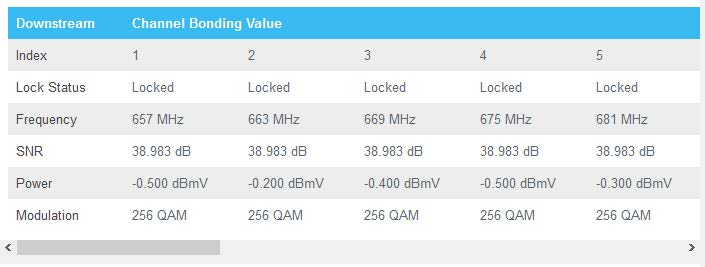
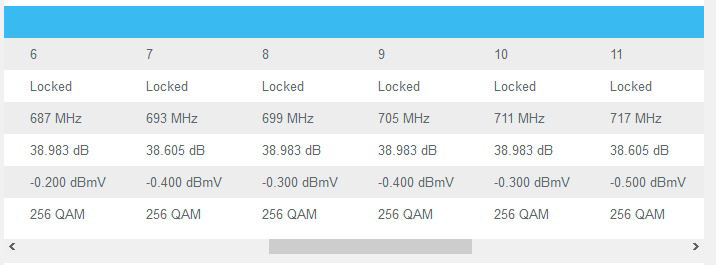
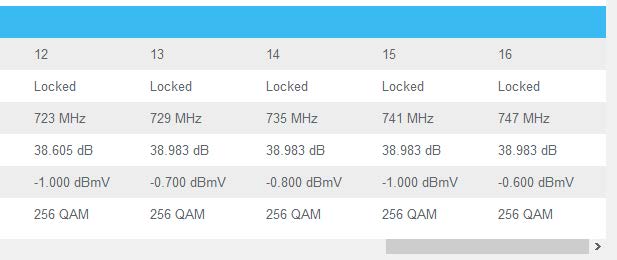
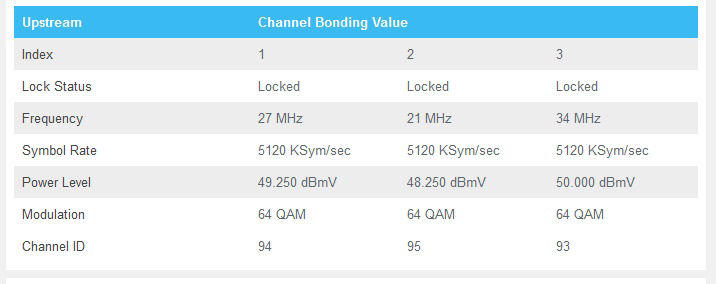
Attached are the downstream/upstream stats. The upstream power level is the only thing that seems to change between reboots and it changes by .250 - .500 dBmV ( for example: 50.000 dBmV may become 50.500 dBmV or 50.250 or visa versa but has remained with that range each reboot)
It was very frustrating, indeed. The tech still does not believe this was the problem as the specs for the modem put 50 right in the center of the operations range (45-54), but I tend to agree that the modem was certainly sensitive to something that was triggering the reboot. It is unfortunate that we will never know for sure, so I am certain others will experience the same problem.Philip wrote:It is possible that one brand is more tolerant to being closer to the limit on upstream power level, for example... Glad it's been solved