
Ok here is the deal I have been reading all these articles on more fans better cooling so forth so on..so i went and bought some fans, cut holes blah blah blah..here is the question can someone tell me why the fans that i hook up to the motherboard spin faster than the exact same fan i have hooked up by splicing into a y connector..I know i probably shouldn't have spliced but i know it can be done so any info would be very much appretiated
oh and by the way i have this really huge fan that was bought a radio shack um excuse my ignorance but it is 120vac 60hz 22w it has two black wires coming out of it...i can't get it to work...where do i hook up the wires to get it to run..
[ 02-01-2001: Message edited by: david24151 ]
Fan Help

Caveat " This is just my opinion"
Now on to the response::
You do not need that many fans my friend. You know the whole point of A CPU fan is merley to remove the heat from the Heatsink. Technically it is not meant to be the primary cooling factor on a cpu. The Heatsink is. That Big fan with the Two black wires coming out is to me an AC fan needing an AC current. Only DC fans for you my friend. You only need a CPU fan to cool the heatsink and and Fan in the back of the case to remove the heated air. You already have a FAN in the power supply to remove heat as well. But since you are overclocking I assume you are pumping out extra heat. I hoped this little piece of **** of a response helps you a little. After all I am scum.
Now on to the response::
You do not need that many fans my friend. You know the whole point of A CPU fan is merley to remove the heat from the Heatsink. Technically it is not meant to be the primary cooling factor on a cpu. The Heatsink is. That Big fan with the Two black wires coming out is to me an AC fan needing an AC current. Only DC fans for you my friend. You only need a CPU fan to cool the heatsink and and Fan in the back of the case to remove the heated air. You already have a FAN in the power supply to remove heat as well. But since you are overclocking I assume you are pumping out extra heat. I hoped this little piece of **** of a response helps you a little. After all I am scum.
Not to Be is Best.
-
david24151
- Member
- Posts: 81
- Joined: Wed Apr 26, 2000 12:00 am
- Location: Georgia
thanks for reply i am now trying to just get the two fans running at there first fast speed..something happened to the connectors on the motherboard cuz now if i plug in the fans they don't move..i don't see any burns or anything don't smell anything so i don't know why this is so..that big fan is no prob..i had it so i wondered if i could use it..but is there a way to get the fans spinning fast again by connecting them to the power adapters..just curious cuz i have a duron 700@784 (not big jump but it is all my motherboard will allow) it used to run at 40-45c now it is at 50-58c and it is hot..so any additional info would be nice...thanks

I do not know why the fans would not run if placed in the original config you had. Are you sure you have the polarity ok? Plug it in the other way and try it. Also, I had a fan once that was only 5V. I didn't know this and plugged it in a 12V connecter. The fan spinned very fast and burnt out. A real rush man if you can spare a fan. Remember, a 12V DC Fan has a Red wire (12V) and a blue or black (Ground). If you spliced and have the RED going to the RED(12V) and Black going top Black ground then it is getting the same power as plugging the fan directly in a fan header on the motherboard. I do it all the time. The only thing I do different is I cut the power down to 7V because it creates less noise. I connect the RED wire (12V) to the Yellow (5V) and the Black to the RED (12V). Hence. I'm getting 7V and a reduction in RPM with a little less performance in Air Circ. Hope this helps my friendly friend.
Not to Be is Best.
-
david24151
- Member
- Posts: 81
- Joined: Wed Apr 26, 2000 12:00 am
- Location: Georgia

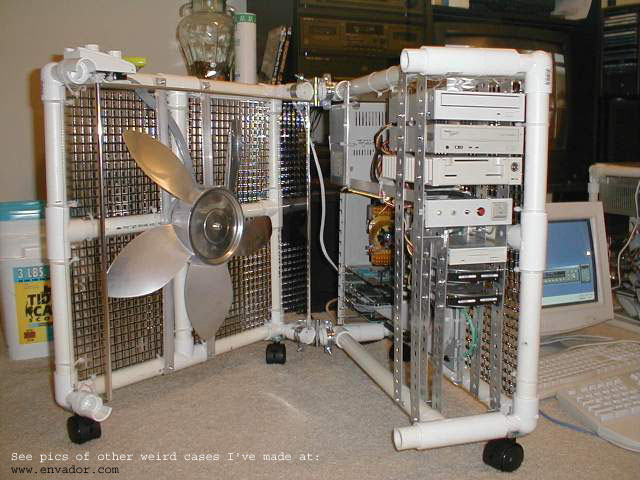


David, I have to say when I saw that picture A big smile came to my face and I am very so-much impressed. I do not think I have ever seen a rig like that. You built that yourself? My god you are a madman. Here I am trying to help you hook up a fan and you are the veritable GOD of the FAN. Well Done. I still can't believe my eyes when I see that set-up. But It has given me some very good ideas on some modifications I have been wanting to do to my BOX. So, I thank you.
Regards, Your Friend SCUM.
Regards, Your Friend SCUM.
Not to Be is Best.
-
david24151
- Member
- Posts: 81
- Joined: Wed Apr 26, 2000 12:00 am
- Location: Georgia
