Firefox problem -Need help

General software, Operating Systems, and Programming discussion.
Everything from software questions, OSes, simple HTML to scripting languages, Perl, PHP, Python, MySQL, VB, C++ etc.
Post Reply
User avatar
Tawcan
Posts: 1897
Joined: Sat May 04, 2002 1:13 am
Location: Vancouver eh?

Firefox problem -Need help

Post by Tawcan »

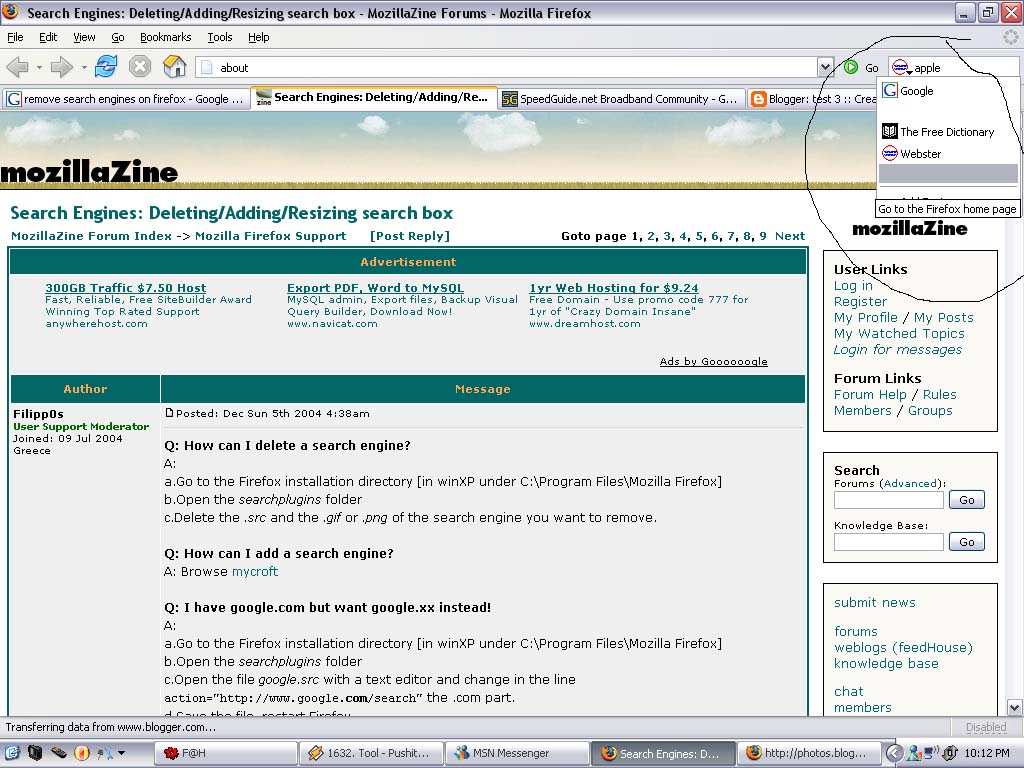
Just updated my Firefox to 1.5 today and I found that dictionary.com is no longer in the search box. So I tried adding search engines but now I have blanks in the search engine field.

Image

http://photos1.blogger.com/blogger/2243 ... copy.0.jpg

Any idea how I can fix this? :irate: :irate:

Thanx!
User avatar
YARDofSTUF
Posts: 70006
Joined: Sat Nov 11, 2000 12:00 am
Location: USA

Post by YARDofSTUF »

Dont have 1.5, cant see the image.

blanks in the drop down menu to select an engine?
Joe
SG Elite
Posts: 8585
Joined: Sat Jun 02, 2001 7:36 pm
Location: USA

Post by Joe »

your photo isnt working...
▼▼▼
www.facebook.com/joe.wanner
twitter.com/TheRealBazooka
mrawesome.tk
▼▼▼
User avatar
Jim
SG VIP
Posts: 13229
Joined: Mon Oct 16, 2000 12:00 am

Post by Jim »

Joe wrote:your photo isnt working...
Copy and paste the link:
http://photos1.blogger.com/blogger/2243 ... copy.0.jpg
User avatar
YARDofSTUF
Posts: 70006
Joined: Sat Nov 11, 2000 12:00 am
Location: USA

Post by YARDofSTUF »


That did it.

Tawcan, how did you add them?
User avatar
Tawcan
Posts: 1897
Joined: Sat May 04, 2002 1:13 am
Location: Vancouver eh?

Post by Tawcan »

I went to add search engine, browsed through more search engines, found dictionary.com, then added it.
User avatar
YARDofSTUF
Posts: 70006
Joined: Sat Nov 11, 2000 12:00 am
Location: USA

Post by YARDofSTUF »

Do you have any theme installed from an older FF install or that one?

Dunno, I dont see anything on it.
User avatar
Tawcan
Posts: 1897
Joined: Sat May 04, 2002 1:13 am
Location: Vancouver eh?

Post by Tawcan »

Yep i have older theme installed from an older FF install...

Let me try uninstalling them.
User avatar
Tawcan
Posts: 1897
Joined: Sat May 04, 2002 1:13 am
Location: Vancouver eh?

Post by Tawcan »

nope same thing. :(
User avatar
YARDofSTUF
Posts: 70006
Joined: Sat Nov 11, 2000 12:00 am
Location: USA

Post by YARDofSTUF »

Maybe try posting on mozillazine. No clue.
User avatar
Tawcan
Posts: 1897
Joined: Sat May 04, 2002 1:13 am
Location: Vancouver eh?

Post by Tawcan »

Tried a clean install of Firefox and then started from the beginning. No messing up this time.
User avatar
mnosteele52
Posts: 11913
Joined: Tue Jul 24, 2001 12:00 pm
Location: Chesapeake, VA

Post by mnosteele52 »

Tawcan wrote:Tried a clean install of Firefox and then started from the beginning. No messing up this time.
Yep, that's always the best thing to do. First backup your bookmarks and such with the Mozilla Backup Tool then uninstall and manually delete all the Firefox directories then install the new version and use the backup tool to put everything back.

:)
User avatar
stevebakh
Posts: 3228
Joined: Wed Aug 07, 2002 12:00 pm

Post by stevebakh »

If you're going to do that, wouldn't it be easier to simply copy the bookmarks.html file from your mozilla/firefox profile directory and then simply move back into the new profile directory after you re-install?
User avatar
mnosteele52
Posts: 11913
Joined: Tue Jul 24, 2001 12:00 pm
Location: Chesapeake, VA

Post by mnosteele52 »

Yeah if that's all you want to backup, with this tool you can backup other options as well.

:)
Post Reply