Need help subnetting my network
-
Theoutdoorsman
- New Member
- Posts: 5
- Joined: Fri Mar 04, 2011 7:16 pm
Need help subnetting my network
I have a simple task that is absolutely driving me crazy. I am almost too embarassed to have to ask, but I need to subnet a network into three subnets. My AP is connected directly into my Untangle box, which is configured with a static ip address of 192.168.1.1 /27 (255.255.255.224)(DHCP is enabled). This subnet mask "should" allow me to configure up to 8 subnets. If a pc is connected to the LAN interface of the UT server, I have internet access. If, instead, I connect the LAN interface to a switch I "should" be able to connect a router to that switch and subnet this network. If someone could assist me with configuring just one of these routers, I would be most grateful. If I could simply get through the configuration of the first, I think I can take it from there. Many thanks, in advance, for any and all advice.
-
Theoutdoorsman
- New Member
- Posts: 5
- Joined: Fri Mar 04, 2011 7:16 pm
What has been done:
Asus RT-N16 (router being configured)
STILL NO INTERNET ACCESS ?!?!?!?
*** Can anyone at least confirm I am headed in the right direction with this? ***
Asus RT-N16 (router being configured)
- Has been configured with a static IP address of 192.168.1.97 and subnet mask255.255.255.224
- Has been placed in "Router" mode. (This disables NAT to allow communication and sharing services among LAN and WAN clients.)
- Firewall has been disabled.
- A static LAN route has been assigned to 192.168.1.1 (UT servers IP) I am uncertain as to what figure should be placed in the "Metric" field, however.)
STILL NO INTERNET ACCESS ?!?!?!?
*** Can anyone at least confirm I am headed in the right direction with this? ***
-
Theoutdoorsman
- New Member
- Posts: 5
- Joined: Fri Mar 04, 2011 7:16 pm
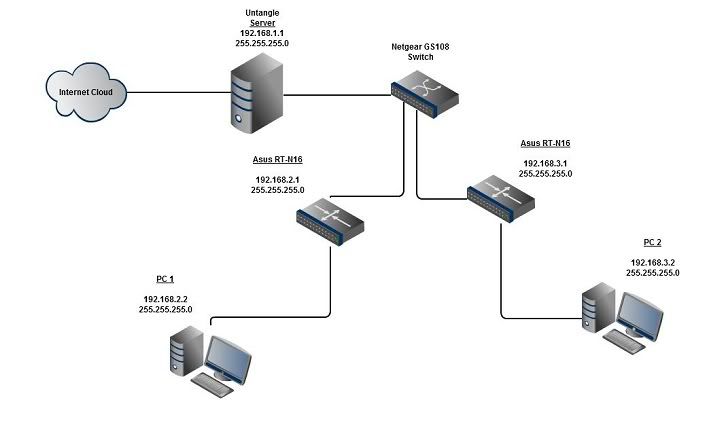
I have reverted back to a /24 subnet mask for this project. Still no joy!?!?! If I connect a pc to the switch, I can connect to the LAN interface of the UT server. However, I can not connect to the internet via router. Here is a diagram of the network I am trying to configure. I am only concerned with the configuration of one of the routers. The other, I should be able to configure on my own. This should be a simple project, but I am loosing hair FAST! Someone PLEASE help me out with this!!!
-
Theoutdoorsman
- New Member
- Posts: 5
- Joined: Fri Mar 04, 2011 7:16 pm