Page 1 of 1
TCP Optimizer version 3.0.8 released
Posted: Sat Sep 17, 2011 2:06 pm
by Philip
We've updated the SG TCP Optimizer!
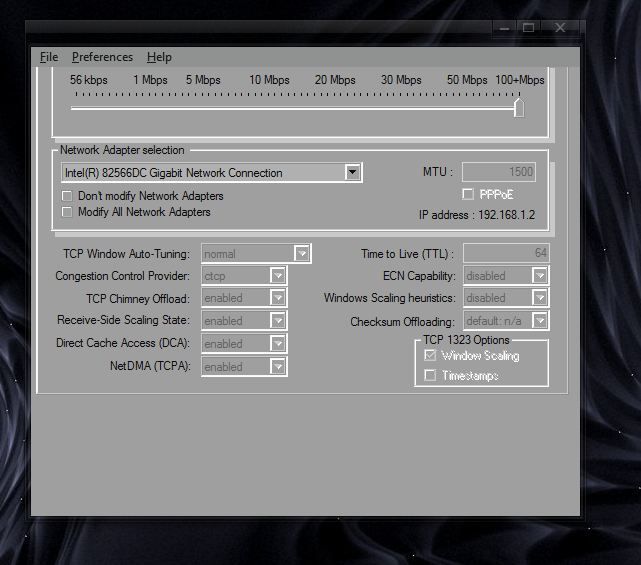
As with all 3.x versions the software supports all Windows OSes from Windows 9x to the latest Windows 7 release in both x86 and x64 variants.
This build is now the latest stable release. It can be downloaded from the same location as previous releases:
[CENTER]
TCP Optimizer v 3.0.8 (09/17/2011)[/CENTER]
Please post bug reports, comments and feedback about the release in this thread.
For any personal questions, help with tuning your connection, please start a new thread with your current settings and enough information so we can help you.
The online documentation is not yet updated with all new settings, but available here:
TCP Optimizer Documentation
The documentation includes a
change log as well.
3.0.8 versin changes:
- Added NetworkThrottlingIndex gaming tweak to the Advanced tab
- Changed "MaxUserPort" optimal value from 65535 to 65534.
- minor internal improvements
You can view legacy versions/updates and past issues with the program in the following threads:
3.0.7 3.0.6 3.0.4 3.0.3 3.0.2 3.0/3.0.1
2.0.3 2.0.2 final 2.0.2 RC2 2.0.2 RC1 2.0.2 beta
2.0.1 2.0.0 final 2.0.0 beta
Feedback:
Please post any constructive feedback and bug reports in this thread.
We'd especially like to know if you're running an international version of Windows whether the current netsh settings and MTU (General tab) are correctly recognized by the new version.
Note: Any posts asking questions about how to tweak your internet connection using the Optimizer should be posted in a separate thread, and will be deleted or moved from this thread.
Posted: Sat Sep 17, 2011 2:16 pm
by RaisinCain
I still do not understand why this is still being targeted to Win 7 users. Just my 2 cents.
Posted: Sat Sep 17, 2011 3:51 pm
by Philip
The TCP Optimizer is targeted toward all Windows users, it includes a number of settings for tweaking Windows 7 as well.
Posted: Sat Sep 17, 2011 5:33 pm
by madhouserevival
When will there ever be a new guide for this program? The interface isn't even close to version 2.0, albeit the mouse over text is most helpful. Took me forever to notice it LOL
Posted: Sat Sep 17, 2011 7:27 pm
by Philip
The program detects the OS and the interface differs depending on the available settings for your particular OS... We do have a tweaking article for Windows 7/Vista/2008 that explains most of the settings in detail, however, you're right that we need to update the documentation.
Posted: Sun Sep 18, 2011 2:48 am
by dafmat71
Hi all, thx for this update of this great tool!!
With the last builds i used Optimal setting, but now i see a gamer option, im not a gamer, i never play, so: is optimal setting always the good setting or must i modifiy a thing in Custom??
thx!

Posted: Mon Sep 19, 2011 10:21 am
by Philip
The "Optimal" settings are still best for most people.
There are a couple of Gaming tweaks in the Advanced tab, and the "Optimal" settings already change one of them that we believe will benefit most users.
The other gaming tweak (disabling nagling) is specific to some games, and we do not recommend changing it for normal internet use as it has some downsides. You can check the Windows 7 tweaking article for more information on each of those settings if you'd like.
Thanks for the nice words about the program, we try.
Posted: Mon Sep 19, 2011 10:24 am
by dafmat71
OK, so i let it like that!! THX a lot!!
Posted: Sun Sep 25, 2011 4:11 am
by 100 010 00
bravo philip.... continue with this job

Another thing. Just below "networkthrottlingindex" value, is the "SystemResponsiveness" value which indicates the amount of cpu load that is being used for multimedia against network. Let's say that a value of 50 helps alot for game playing. test it and if u like it u can add it in nagle algorith session with no recommendation. Servers have a value of 100 i think.
Another one. I think there is a little bug with ie connections. When u apply the settings the pop up "apply window" shows no change in those 2 values and the values are opposite between them. U change maxconnectionsperserver and shows the change for 1_0 servers setting. but the values are written with the right way in registry. is a monitor bug only. take a look at this.
The tip here (i mean in the same path), is that u can tweak MSN and SKYPE with the value of 8, default is 6. They work better under value 8 when u use a video conference. Take a look at this also.
3G/UMTS, Help and FAQ as PDF/CHM, Other Languages ???
Posted: Tue Oct 11, 2011 8:37 pm
by CleanaZ
Hello,
it's a really goog program, but i miss some features.
i have a 3G/UMTS Modem (HUAWEI Mobile Connect - 3G PC UI Interface) from the
German telecom to connect my computer via GSM/UMTS with the internet.
But the "Huawai" Adapter is not listed in the "network adapter selection" of
TCP Optimizer - is there no support for those GSM/UMTS modems ???
Can you convert the online help/documentation and the FAQ of TCP-Optimizer
to a PDF document and link to it (after downloading together with TCP-Optimizer)
in the "help" menu of TCP-Optimizer - thus we can read the documentation
offline ??
Is it possible to get a language file of TCP-Optimizer to translate it to other
languages like german ?
Greetings from Germany
Ralf
Posted: Wed Mar 28, 2012 11:50 am
by PCgamer
Great Tool! Thanks

EDIT:
Is there a discussion in the forums about this or just through the article located here:
http://www.speedguide.net/articles/wind ... /#comments ???
Posted: Sat Jul 07, 2012 2:13 am
by timerrington
Will there be an update of this program that will work with Windows 8?
Posted: Wed Aug 22, 2012 4:06 am
by jonathansmith
It is good to use TCP optimizer for security purpose i have used it. Hope this will also add positive value regarding security purpose.
Posted: Mon Sep 24, 2012 9:20 pm
by Michael Avanessian
Doesnt work for me on a new clean install of Win7 64bit all patched up. All drivers are WHQL tested.
Posted: Tue Sep 25, 2012 12:22 am
by fashionever
I also do not understand why this is still being targeted to Win 7 users. Just my 2 cents.
Posted: Wed Oct 31, 2012 9:47 am
by RoundEye
RaisinCain wrote:I still do not understand why this is still being targeted to Win 7 users. Just my 2 cents.
Why? I still have Win7 64 bit. It's probably the last upgrade I'll ever do, I'm getting tired of PC's and upgrades. I'm not tired of modding though.

Posted: Sun Nov 11, 2012 3:08 pm
by illiad
fashionever wrote:I also do not understand why this is still being targeted to Win 7 users. Just my 2 cents.
your message is now very old, it should be talking about win 8 ... :/
How about ACTUALLY reading the OP??? it is targeted (YOUR word, not SG!! ) "all Windows OSes from Windows 9x to the latest Windows 7" and that will change soon to 8....

Posted: Fri Feb 01, 2013 7:34 am
by DMichael
bug:
tcpdelackticks its not detected..its says default when the value on 0
Posted: Mon Feb 25, 2013 10:39 am
by 100 010 00
Hi philip.... its an old patch but as i can see, u have not include it in the tcp optimizer but it works fine. it goes with nonbesteffortlimit and is about for the limit of outstanding packets.
"MaxOutstandingSends"=dword:00000000
Posted: Mon Feb 25, 2013 11:34 am
by Philip
AFAIK, the MaxOutstandingSends is a QoS Packet Scheduler-specific setting. If it is not configured in the registry (or disabled), it does not limit the number of outstanding packets. If you specify a number, it then limits the number of outstanding packets, the scheduler postpones all submissions to network adapters until the number gets below this limit. In other words, if the setting is not in the registry (default), it is not limiting the number of outstanding packets.
Posted: Mon Mar 04, 2013 6:45 pm
by blixtgo
My very, very major congratulations to whoever provided this little gem of a program.
I use wireless broadband on a Win XP home 32 bits computer. My download speed has been around 6 Mbits/s, while the service provider claims I should be getting much more. I tried resetting the TCP/IP stack using the netsh command which did not help.
Just now I DL'ed and ran your gem using 20 Mbits/s and optimize. Download speed as around 21 Mbits/s. As we say in Swedish, Du är helt enkelt ett geni! Stort tack!
Posted: Fri Apr 19, 2013 9:57 am
by dnsmo
will this also work on windows 8 x64?
Posted: Wed Jul 03, 2013 2:02 pm
by darrinster
I would include that other things can cause your internet to be slow or cause latency. Possible bad wires, modem, router, spyware/malware/virus, can and will cause issues with your internet speed. These things should be ruled out before trying to tweak your settings.
I have cable internet, and I did get a slight increase just by applying optimal settings. It did how ever cause the upload speed to decrease. I don't really need to tweak my settings, just would like to understand the program and help others.
Posted: Tue Dec 03, 2013 11:48 am
by sohel1211
TCP Optimizer version 3.0.8 maybe not working with windows 8.................
Posted: Wed Dec 18, 2013 2:14 pm
by Rizathivax
Although they have updated TCP Optimizer to v3.0.8 which has helped with the differences introduced by Windows 7 SP1 & to some part the differences brought by IE 11. Here is what I've found out as to the problem with Windows 8. Where the earlier versions of Windows used TCP/network settings which applied to all programs, even if they are stored as virtual, Windows 8 now has the settings in multiple locations (an extension of Windows 7 & Vista's per user Virtualization). Each setting now has it's own location & has separate settings for each program. TCP Optimizer which works with system wide & virtual settings, doesn't have the ability to track down the now separate per program settings. Windows 8 ignores all general settings if it has settings for the program itself, so yes the changes are made to the registry, but Windows 8 ignores them.
Posted: Wed Jan 08, 2014 7:31 am
by meteora25
Hello, i need help. there a tweaks at the Windows 7, Vista, 2008 Tweaks. My question is, is the tweaks the same as using SG TCP Optimizer? will there be any slight changes if using one of the methods?
Posted: Sun Mar 02, 2014 12:58 pm
by KEiGHT
This program needs some updates, like; Dial-UP RAS MTU or TCP Receive Window, like in Dr. TCP !
Why those are not present ? It is a very helpful tool but it needs a little improve to actual windows 7 and 8.1 !
Why this site shows my MTU 1440 if my Router is set with 1500 ? in windows registry is set 1500 even loopback
Idx Met MTU State Name
--- ---------- ---------- ------------ -----------------------
1 50 1500 connected Loopback Pseudo-Interfa
11 20 1500 connected Local Area Connection
what is the problem with that and what can I do to improve it ?
Posted: Sun Mar 02, 2014 2:56 pm
by Philip
The program changes the TCP Receive Window on OSes that suppor it.
Your ISP, or the protocols used may change the MTU that is on your end, i.e. your registry/router - the Analyzer shows what your end advertises when connecting to our server, this is the MTU that actually reaches servers.
Posted: Sun Mar 02, 2014 10:36 pm
by Nicholas Steel
I notice the documentation was never updated. It doesn't mention what most settings under the General Settings tab do :/
If someone could explain the settings, that'd be brilliant!
Posted: Tue Mar 04, 2014 5:05 am
by KEiGHT
It would be nice at least to be explained for each windows in part !
Posted: Tue Mar 04, 2014 10:43 am
by Rizathivax
meteora25 wrote:Hello, i need help. there a tweaks at the Windows 7, Vista, 2008 Tweaks. My question is, is the tweaks the same as using SG TCP Optimizer? will there be any slight changes if using one of the methods?
Most of the settings (tweaks) are well know & can be found all over the net. What SG TCP Optimizer does is bring all of them to one place & allows you to make changes, while keeping a backup of the setting, each step of the way. This allows you to try the included "tweaks" & to try other custom "tweaks" to see which works best for you.
Also remember, while the "tweaks" may work for most people, they may not be the answer to all problems, filtering software, antivirus software, out of date drivers & out of date browser plug-ins, can still cripple your internet experience.
Posted: Fri Mar 21, 2014 1:18 am
by KEiGHT
Something is wrong with Optimizer 3.0.8 ...
Even is set in the registry connections per server, The Optimizer don't recognize that in windows 7 SP1 ultimate x64!
Why is that ?
[HKEY_LOCAL_MACHINE\SOFTWARE\Microsoft\Internet Explorer\MAIN\FeatureControl\FEATURE_MAXCONNECTIONSPER1_0SERVER]
"explorer.exe"=dword:00000008
[HKEY_LOCAL_MACHINE\SOFTWARE\Microsoft\Internet Explorer\MAIN\FeatureControl\FEATURE_MAXCONNECTIONSPERSERVER]
"explorer.exe"=dword:00000008
If I will modify registry, optimizer will not recognize it! because of what ?
Posted: Fri Mar 21, 2014 9:43 am
by Rizathivax
KEiGHT wrote:Something is wrong with Optimizer 3.0.8 ...
Even is set in the registry connections per server, The Optimizer don't recognize that in windows 7 SP1 ultimate x64!
Why is that ?
[HKEY_LOCAL_MACHINE\SOFTWARE\Microsoft\Internet Explorer\MAIN\FeatureControl\FEATURE_MAXCONNECTIONSPER1_0SERVER]
"explorer.exe"=dword:00000008
[HKEY_LOCAL_MACHINE\SOFTWARE\Microsoft\Internet Explorer\MAIN\FeatureControl\FEATURE_MAXCONNECTIONSPERSERVER]
"explorer.exe"=dword:00000008
If I will modify registry, optimizer will not recognize it! because of what ?
That would be, since you're using x64 Windows, The Optimizer is using these keys for those settings.
HKEY_LOCAL_MACHINE\SOFTWARE\Wow6432Node\Microsoft\Internet Explorer\MAIN\FeatureControl\FEATURE_MAXCONNECTIONSPER1_0SERVER
"explorer.exe"=dword:00000008
HKEY_LOCAL_MACHINE\SOFTWARE\Wow6432Node\Microsoft\Internet Explorer\MAIN\FeatureControl\FEATURE_MAXCONNECTIONSPERSERVER
"explorer.exe"=dword:00000008
Posted: Sat Mar 22, 2014 8:26 am
by KEiGHT
Thanks Riza !
Posted: Wed Apr 16, 2014 7:37 am
by KEiGHT
the question is; what explorer.exe is that in Windows 7 ? as far as I know there must be set another things ;
like iexplore.exe of this registry settings;
[HKEY_LOCAL_MACHINE\SOFTWARE\Microsoft\Internet Explorer\MAIN\FeatureControl\FEATURE_MAXCONNECTIONSPER1_0SERVER]
"explorer.exe"=dword:00000010
"iexplore.exe"=dword:00000010
[HKEY_LOCAL_MACHINE\SOFTWARE\Microsoft\Internet Explorer\MAIN\FeatureControl\FEATURE_MAXCONNECTIONSPERSERVER]
"explorer.exe"=dword:00000008
"iexplore.exe"=dword:00000008
Mismatch MaxConnectionsPer1_0Server
Posted: Tue Jun 10, 2014 2:55 pm
by KEiGHT
look at this picture ! both are inverse in Optimizer when is in Apply function on Windows 7 x64!

Posted: Tue Sep 30, 2014 12:12 pm
by aburnes
please update the documentation!
Posted: Tue Feb 03, 2015 7:51 am
by KEiGHT
Another BUG in TCP Optimizer !
The program saves NonBestEfforLimit instead of NonBestEffortLimit for Windows 7 x64
missing a letter, T here^
[HKEY_LOCAL_MACHINE\SOFTWARE\Policies\Microsoft\Windows\Psched]
"NonBestEffortLimit"=dword:00000000
Posted: Sun Apr 19, 2015 10:59 pm
by Philip
We have released the beta version of SG TCP Optimizer 4.0, so this thread is deprecated. Please report any remaining bugs and post comments in the new TCP Optimizer 4.0 thread here:
https://www.speedguide.net/forums/ ... supported)