Page 1 of 1
Windows 8 Consumer Preview
Posted: Wed Feb 29, 2012 3:07 pm
by YARDofSTUF
So I never got around to installing teh Windows 8 dev build, but I grabbed teh Consumer Preview today. Wow do I hate the metro start screen. lol
I really hope they add a traditional start menu, or I'd need to put all my programs shortcuts on the desktop.
The Metro start would be good for touchscreens though.
The notifications that pop up saying stuff like "A new app that uses teh web is installed" that fill up a big chunk of the screen is also annoying/ugly. Kinda like something I'd expect on a phone.
It does seem smooth and fast but I certainly wont upgrade to it as it is. The Windows Vista/7 start button with 10 programs of my choosing and then "All Programs" is nice and quick, navigating between the start screen, all apps, and desktop in Windows 8 is not.
So hopefully the metro style wont become the common way of programming desktop apps so that Windows 7 can stay around for a good long time.
Posted: Wed Feb 29, 2012 6:51 pm
by YARDofSTUF
Adding some pictures.
Welcome screen, you drag this up and are then presented with a login screen:

This is my current desktop:

The Start Screen which replaces the Start Button:

And the full list of programs on the Start Screen:

Posted: Wed Feb 29, 2012 6:58 pm
by Mark
is this an actual install or in a virtual machine ?
i'm gonna try it in VMware
Posted: Wed Feb 29, 2012 6:59 pm
by YARDofSTUF
Mark wrote:is this an actual install or in a virtual machine ?
i'm gonna try it in VMware
Virtual Machine, I used Virtual Box since I saw a few complaints from people using VMware Player.
Posted: Wed Feb 29, 2012 7:14 pm
by Mark
YARDofSTUF wrote:Virtual Machine, I used Virtual Box since I saw a few complaints from people using VMware Player.
ya i am getting errors in VM player but am doing an update to it right now, will see if it helps
Posted: Wed Feb 29, 2012 7:40 pm
by Mark
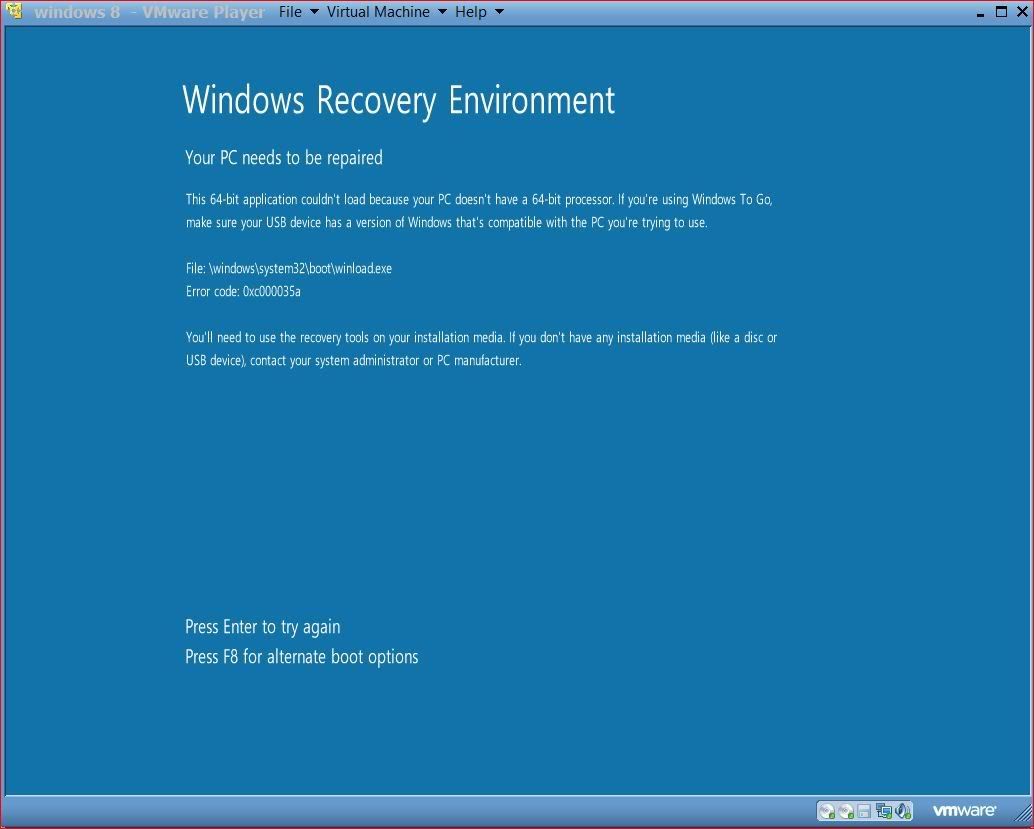
bah, WTH is this message mean LOL
whatever i am to tired to mess with it now.............
Posted: Wed Feb 29, 2012 7:44 pm
by YARDofSTUF
Just get Virtual Box, its free and the install was easy.
Posted: Wed Feb 29, 2012 7:46 pm
by Mark
YARDofSTUF wrote:Just get Virtual Box, its free and the install was easy.
i may do that, i have used it in the past as well

Posted: Wed Feb 29, 2012 11:56 pm
by Sava700
This version is really no reason to upgrade from Win7.... it is built with tablets in mind which is a market that Microsoft has yet to jump into and needs to get into. You can bet many of the under the hood features of Win8 will come with a Sp2 for Win7 in the future after its official release or at the very least be something you can download and add to the OS. Tryin this on a laptop...it runs ok but really no different than Win7 aside from metro which is just IMO not the way to go unless you are again focusing on a tablet function...will not fly well with older people used to how windows has been for the last 15years if they go out and purchase a new computer with it on there in this format.
Posted: Fri Mar 02, 2012 6:55 am
by The Dude
I agree with Sava, Metro isn't the way to go on a non touch device. It can be a real pain to use on anything that doesn't have a touch screen. It may be a pain on a touch screen too, but I've only ever used it on a desktop PC and a laptop. I'm not liking it at the moment. It seems there is a mandatory 3 to 5 mouse clicks to do "anything". It would seem Microsoft thinks you are going to like it so much that you'll never shut it down, because they have gone out of their way to hid that too.

Posted: Fri Mar 02, 2012 9:13 am
by YARDofSTUF
Ya its definitely made with touch screens in mind first. But Even if I had a touchscreen on my desktop, I think I'd still prefer to use a mouse.
And if you havent found the shutdown yet, you go to the desktop, put the mouse in the bottom right corner and then when the widget thign pops up slide the mouse up, click settings, and then click the power button. Simple! lol
Posted: Fri Mar 02, 2012 9:37 am
by The Dude
Ya, I think you'd need a tablet to really decide if its usable. I wouldn't mind having a touch screen on my laptop, I'd be way more inclined to use it over the touch pad. I might even use a touch screen on an all in one, but on my desktop its a bit of a reach to touch the screen so I don't see ever buying one for it. I'd be using my trackball almost all the time anyway. Ya, I found the shutdown button eventually, It's easier to use the one right on the front of my case though.

I've got other problems though. It was freezing on a cold boot right at the beta fish screen with the juggling balls. If I press the reset button it boots up fine on the next go around. I updated my chip-set drivers and sound drivers and now it looks like its rebooting on its own right at the same point. I see the BIOS POST screen twice and then windows loads OK? Haven't really had a chance to see what might be happening to cause it yet.
Posted: Fri Mar 02, 2012 4:55 pm
by RaisinCain
It's a frickin' preview people.
Posted: Fri Mar 02, 2012 6:17 pm
by YARDofSTUF
RaisinCain wrote:It's a frickin' preview people.
Oh my bad are we only suppose to say "woa its so cool" or something like that?
I think you had a similar comment during the dev release. So at what stage is feedback about it ok?
Posted: Fri Mar 02, 2012 6:42 pm
by RaisinCain
YARDofSTUF wrote:Oh my bad are we only suppose to say "woa its so cool" or something like that?
I think you had a similar comment during the dev release. So at what stage is feedback about it ok?
Meaning?
Posted: Fri Mar 02, 2012 7:38 pm
by ace
RaisinCain wrote:Meaning?
Meaning if you dont have anything to say about the topic then STFU!!! Almost all your posts are like this, why not just hit the back button?
Fricken retard...
Posted: Fri Mar 02, 2012 8:38 pm
by Dan
ace wrote:Meaning if you dont have anything to say about the topic then STFU!!! Almost all your posts are like this, why not just hit the back button?
Fricken retard...
LOL points for you !
Posted: Sat Mar 03, 2012 6:55 am
by The Dude
RaisinCain wrote:It's a frickin' preview people.
Hm, Its called Consumer
Preview, I think we all new that? So whats your point? I'm sure Microsoft will completelyly redo it just before final release.

Posted: Sat Mar 03, 2012 1:01 pm
by RaisinCain
ace wrote:Meaning if you dont have anything to say about the topic then STFU!!! Almost all your posts are like this, why not just hit the back button?
Fricken retard...
Because, like you, I have an opinion as well. Frickin' Ass****.
Posted: Sat Mar 03, 2012 1:03 pm
by RaisinCain
The Dude wrote:Hm, Its called Consumer
Preview, I think we all new that? So whats your point? I'm sure Microsoft will completelyly redo it just before final release.
No sh**. It is a preview- nothing more or less. When it goes gold there will be significant changes (just like every other Windows release). What I am getting at is all of the bitching everyone is doing concerning the current release.
Posted: Sat Mar 03, 2012 1:04 pm
by RaisinCain
YARDofSTUF wrote:Oh my bad are we only suppose to say "woa its so cool" or something like that?
I think you had a similar comment during the dev release. So at what stage is feedback about it ok?
I would say at least at the RC stage. Only fair IMHO.
Posted: Sat Mar 03, 2012 1:29 pm
by YARDofSTUF
RaisinCain wrote:No sh**. It is a preview- nothing more or less. When it goes gold there will be significant changes (just like every other Windows release). What I am getting at is all of the bitching everyone is doing concerning the current release.
And due to these complaints maybe MS will hear them and put the start button back in as an option. If people didn't voice concerns maybe they wouldn't. MS released this preview for everyone to see it, and offered a feedback option in it cuz they want people's opinions. Waiting till the RC stage might be too late for them to fix things.
Posted: Sat Mar 03, 2012 2:41 pm
by RaisinCain
YARDofSTUF wrote:And due to these complaints maybe MS will hear them and put the start button back in as an option. If people didn't voice concerns maybe they wouldn't. MS released this preview for everyone to see it, and offered a feedback option in it cuz they want people's opinions. Waiting till the RC stage might be too late for them to fix things.
I don't honestly believe that MS is listening at this point- do you? I think that so far they're setting themselves up for another "Vista" situation. I hope that I am wrong. After reading several tech articles on 8, I assume the Metro interface will be present no matter which device you purchase/have already. I just hope that the final version will "know" whether I have a touch screen (whether it be netbook,tablet or desktop) and install accordingly.
Posted: Sat Mar 03, 2012 3:01 pm
by YARDofSTUF
They have put a lot of work into Windows 8, I'm sure they don't want desktop users and businesses to avoid it for the metro start screen that is junk for those users.
Posted: Thu Mar 08, 2012 3:38 pm
by YARDofSTUF
ViStart is awesome for windows 8:
http://lee-soft.com/vistart/
Originally made for XP users, but it works good for Windows 8 too.
Posted: Thu Mar 08, 2012 6:09 pm
by RaisinCain
YARDofSTUF wrote:ViStart is awesome for windows 8:
http://lee-soft.com/vistart/
Originally made for XP users, but it works good for Windows 8 too.
This as well...
http://www.stardock.com/products/start8/
Posted: Thu Mar 08, 2012 7:34 pm
by YARDofSTUF
Ya but that one looks like trash.
Posted: Fri Mar 09, 2012 9:40 am
by RaisinCain
YARDofSTUF wrote:Ya but that one looks like trash.
How's that? It's made specifically for Win 8. I'd rather us it than some crap that was originally meant for XP.
Posted: Fri Mar 09, 2012 11:12 am
by YeOldeStonecat
RaisinCain wrote:How's that? It's made specifically for Win 8. I'd rather us it than some crap that was originally meant for XP.
Uhm...StarDock goes back to the XP days too.
Posted: Fri Mar 09, 2012 11:28 am
by YARDofSTUF
RaisinCain wrote:How's that?
Cuz it uses the metro look.
Posted: Fri Mar 09, 2012 12:30 pm
by RaisinCain
YeOldeStonecat wrote:Uhm...StarDock goes back to the XP days too.
Yeah but this program was recntly written for Win 8.
Posted: Fri Mar 09, 2012 12:30 pm
by RaisinCain
YARDofSTUF wrote:Cuz it uses the metro look.
Better get used to the Metro interface. It's not going away anytime soon.
Posted: Fri Mar 09, 2012 3:52 pm
by YeOldeStonecat
RaisinCain wrote:Yeah but this program was recntly written for Win 8.
Start==>Programs menu hasn't really changed in the past several versions of Windows...it doesn't have to be re-invented to skin Win8 with it. And a quick peruse of the changelogs for VIStart show it's been redone for Win8. You try to make it sound like it's been unchanged since 2002. Skinning Windows with different shells isn't a new game.
Posted: Fri Mar 09, 2012 5:00 pm
by YARDofSTUF
RaisinCain wrote:Better get used to the Metro interface. It's not going away anytime soon.
No. Either MS will add a start bar, a 3rd party group will make a perfect 7 replica, or my next OS will be an Apple or Linux one.
Posted: Fri Mar 09, 2012 5:41 pm
by RaisinCain
YARDofSTUF wrote:No. Either MS will add a start bar, a 3rd party group will make a perfect 7 replica, or my next OS will be an Apple or Linux one.
I guess your ignorance is because you do not follow the cycle of a Windows release. Metro is going nowhere thus far. Whether or not MS makes it an option to disable it upon installation remains to be seen. If you want a Win 7 "replica" then why not even bother with 8 at all? Just run 7 and be happy. BTW Apple and Linux (Ubuntu, etc.) have pissed off users as well. So what it boils down to is which club you want to join?
Posted: Fri Mar 09, 2012 5:42 pm
by RaisinCain
YeOldeStonecat wrote:Start==>Programs menu hasn't really changed in the past several versions of Windows...it doesn't have to be re-invented to skin Win8 with it. And a quick peruse of the changelogs for VIStart show it's been redone for Win8. You try to make it sound like it's been unchanged since 2002. Skinning Windows with different shells isn't a new game.
Duh. I wasn't referring to skinning Windows. Just the programs that were discussed.
Posted: Fri Mar 09, 2012 5:59 pm
by Shinobi
YARDofSTUF wrote:Just get Virtual Box, its free and the install was easy.
I got the same thing Mark did on Virtual box.. Different error code.. I think I'll try to install from the .ISO vice the DVD that I made.
Posted: Fri Mar 09, 2012 8:00 pm
by YARDofSTUF
RaisinCain wrote:I guess your ignorance is because you do not follow the cycle of a Windows release. Metro is going nowhere thus far. Whether or not MS makes it an option to disable it upon installation remains to be seen. If you want a Win 7 "replica" then why not even bother with 8 at all? Just run 7 and be happy. BTW Apple and Linux (Ubuntu, etc.) have pissed off users as well. So what it boils down to is which club you want to join?
I plan to stick with Windows 7 so far, but I do feel like theres a bit of refinement within Windows 8 overall that I like. I'm familiar with windows release cycles. I don't need to join a club, I can pick and choose on each release of each product if I want.


