Page 1 of 1
cable internet tweaking
Posted: Tue Jun 07, 2011 4:44 am
by LordLoki
hi, I'm new to tweaking and I need some help in tweaking. when I download a file, the download speed is averaging to 24-30kb yet my subscription is 1mbps :/ it seems dial up is much faster than my 1mbps cable internet? I want to get the maximum limit speed of my 1mbps cable internet please help me
thanks

« SpeedGuide.net TCP Analyzer Results »
Tested on: 06.07.2011 04:40
IP address: 202.128.xx.xxx
Client OS: Windows 7
TCP options string: 020405b40103030201010402
MSS: 1460
MTU: 1500
TCP Window: 65700 (multiple of MSS)
RWIN Scaling: 2 bits (2^2=4)
Unscaled RWIN : 16425
Recommended RWINs: 64240, 128480, 256960, 513920, 1027840
BDP limit (200ms): 2628kbps (329KBytes/s)
BDP limit (500ms): 1051kbps (131KBytes/s)
MTU Discovery: ON
TTL: 50
Timestamps: OFF
SACKs: ON
IP ToS: 00000000 (0)
my Speed Test

Posted: Tue Jun 07, 2011 11:10 am
by Philip
Did you try the optimal settings in the TCP Optimizer ?
Can you also test from speedtest.net to verify the speed from a server that's closer to you ?
Is that test the only download running at that time, it seems a bit odd that the downstream speed is so much lower than the upstream ?
Do you have your modem/router in close proximity of other devices that may cause EMI (interference), such as power supplies, other routers, etc ?
Ultimately, it may be a problem with the feed from your ISP, I'd definitely contact them as well.
Posted: Tue Jun 07, 2011 11:39 am
by LordLoki
Philip wrote:Did you try the optimal settings in the TCP Optimizer ?
Can you also test from speedtest.net to verify the speed from a server that's closer to you ?
Is that test the only download running at that time, it seems a bit odd that the downstream speed is so much lower than the upstream ?
Do you have your modem/router in close proximity of other devices that may cause EMI (interference), such as power supplies, other routers, etc ?
Ultimately, it may be a problem with the feed from your ISP, I'd definitely contact them as well.
yes i already did the optimal settings, i don't have any router , i only have 1 computer and 1 connection , I don't know why the reason why my internet is so slow compared to dial up its much more better uhhm CABLE internet Vs Dial UP ? and in my state it seems Dial Up is much better o.o

MY SPEEDTEST

Posted: Wed Jun 08, 2011 7:16 am
by LordLoki
Please help me

I want to get the right speed for my Internet
please HELP ME anyone? sir Philip ? Sir RollingStone? Any Expert please help me
Code: Select all
« SpeedGuide.net TCP Analyzer Results »
Tested on: 06.08.2011 07:20
IP address: 202.128.xx.xxx
Client OS: Windows 7

TCP options string: 020405b40103030201010402
MSS: 1460
MTU: 1500
TCP Window: 5840 (multiple of MSS)
RWIN Scaling: 2 bits (2^2=4)
Unscaled RWIN : 1460
Recommended RWINs: 64240, 128480, 256960, 513920, 1027840
BDP limit (200ms): 234kbps (29KBytes/s)
BDP limit (500ms): 93kbps (12KBytes/s)
MTU Discovery: ON
TTL: 50
Timestamps: OFF
SACKs: ON
IP ToS: 00000000 (0)
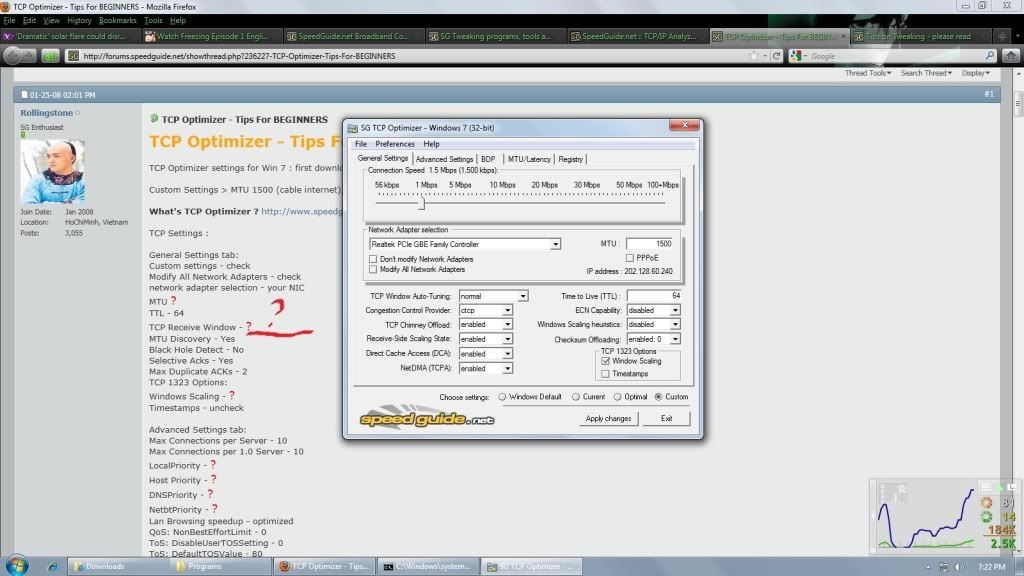 the only thing I could think of is editing it here? please help me
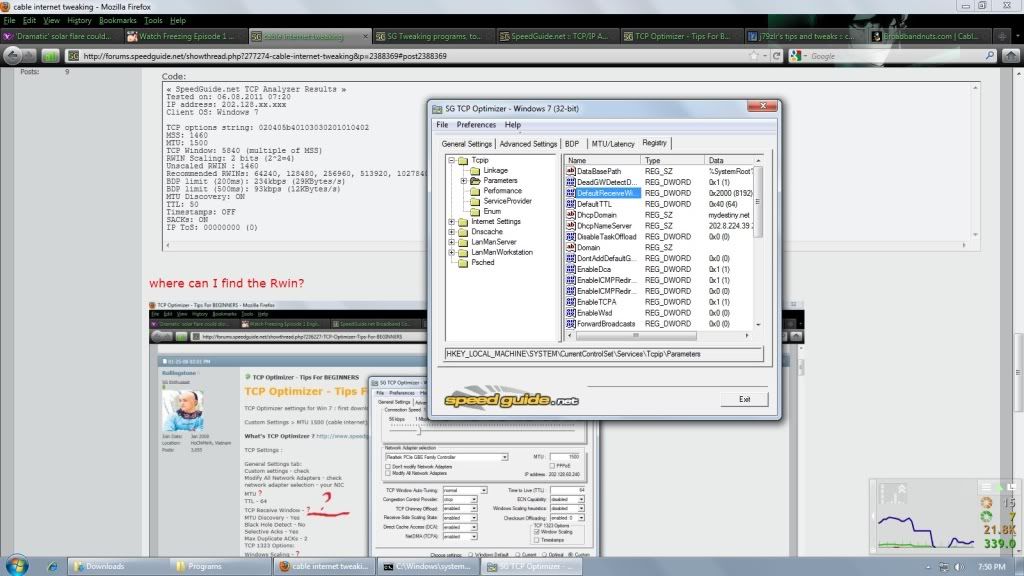
thank you

Posted: Wed Jun 08, 2011 6:10 pm
by trogers
Win 7 autotunes, and Rwin cannot be manually set. Seems your TCP settings are already optimized.
The very low upload speed indicates either the presence of malware, or your have problem with signal quality.
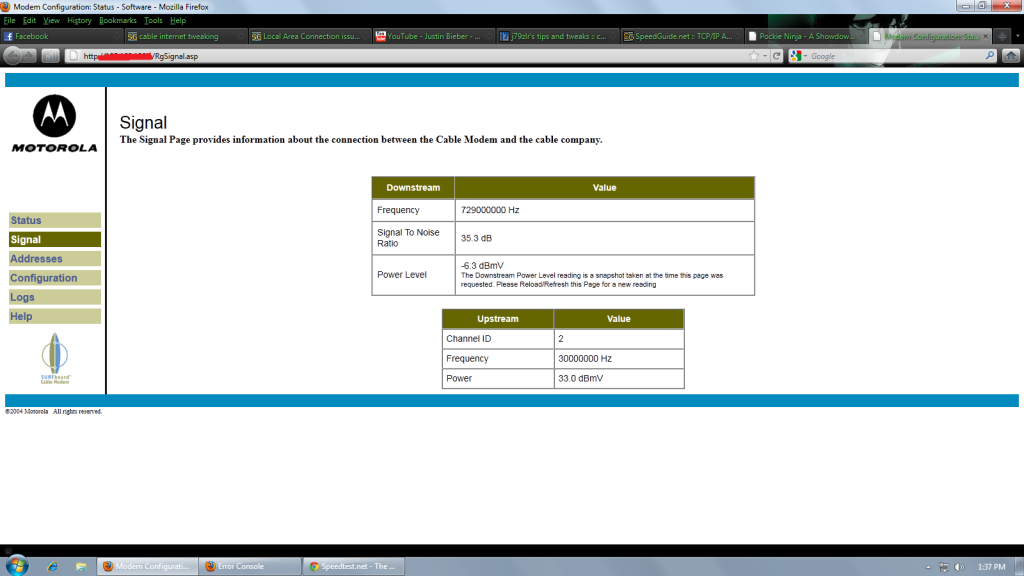
First, log into cable modem and check out its signal power levels.
Posted: Thu Jun 09, 2011 1:47 am
by LordLoki
trogers wrote:Win 7 autotunes, and Rwin cannot be manually set. Seems your TCP settings are already optimized.
The very low upload speed indicates either the presence of malware, or your have problem with signal quality.
First, log into cable modem and check out its signal power levels.
here , sir troger
ahaha justin bieber o.o
Posted: Thu Jun 09, 2011 7:03 am
by trogers
Upstream power level at 33 dBMV is too low. See -
http://www.speedguide.net/faq_in_q.php? ... =92&qid=78
You need to call in your ISP tech to check on signal quality.
Posted: Thu Jun 09, 2011 7:29 am
by LordLoki
ok thanks
) sir trogers , i really appreciate it