Page 1 of 1
Help resolve this problem
Posted: Sun Mar 06, 2005 11:41 pm
by camarof41
Hi everyone,i have strange internet problem with my computer,after hours of wasting time,this forum is my last hope !
Here is the deal...I just got new computer(about 1 month of useing),its P-4 Gateway 2.9Mhz 512RAM and etc. I always used linksys wireless adapter and everything worked fine,but i decided to plug cable from my cable modem directly to my computer,so i dont have to use wireless (and i have to give it up,just because i need direct connection for some things) But after seting everything,its just doesnt work,my internet connection SLOW,it takes forever to get IP from my router,connect to websites or any kind of network activities! My other computers work just fine,i plug cable in them and it just works !! But not my new one,i dont know what is wrong with it ! I have no spyware/viruses or anything like that,my system is clean and everything is just the way it supposed to be! I put my live linux cd,boot it,try to access internet and same thing,its slow!

So i know its not software problem,since both my OS have same problem! I switch to wireless quick and it flyes

I even tried to put new network card and still,no luck !!
It might be my linksys router or my motherboard ?? (but computer is new..i refuse to beleave its mest up) and no worranty for me since i put my new video card,so i screw pretty much,my last chance is some opinions on this forum! Any help apreciated !!

Posted: Sun Mar 06, 2005 11:55 pm
by mccoffee
is the drivers up to date on both cards i don't think it's computer or router what is your netwrok card settings in my computer control panel networking connections in the configure tab ??
Posted: Mon Mar 07, 2005 12:28 am
by camarof41
I just reinstalled drivers,got it from intel website,still same problem...its strange 1 out of 10 times it might load page pretty quick,but after that its froze,trying to connect,waiting for transfer and extremely slow might show one or two images!
About network card settings,what exactly you looking for? I went to config but there is alot of stuff writen..and 3 pages (general,driver,resources)
I have Intel(R) PRO/100 VE Network Connection this one if it helps
Posted: Mon Mar 07, 2005 2:42 am
by mccoffee
what values are in the network card configure properties under general in the networking options in the control panel
Posted: Mon Mar 07, 2005 9:26 am
by camarof41
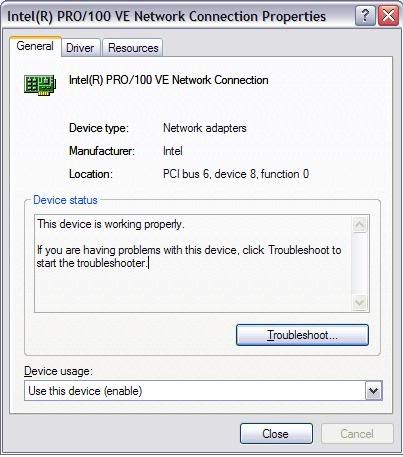
Is that what you looking for?
Posted: Mon Mar 07, 2005 8:49 pm
by camarof41
i guess this is where it all ends
Posted: Mon Mar 07, 2005 9:36 pm
by mccoffee
did you get those drivers from intel or microsoft.com usualy has more options
Posted: Mon Mar 07, 2005 11:39 pm
by camarof41
i got them from intel
but how come 2 other computers dont need any drivers,and its weird my second comp have slow connection also,i just dont get it
Posted: Tue Mar 08, 2005 12:06 am
by mccoffee
http://www.speedguide.net/read_articles.php?id=177 i misread your thread the first time this should speed up the ip process sorry about hat.
Posted: Tue Mar 08, 2005 12:41 am
by camarof41
I dont think this article relate to my problem at all

Posted: Tue Mar 08, 2005 1:01 am
by mccoffee
it takes forever to get IP from my router,connect to websites or any kind of network activities! yes give the computers manual ip addresses then you don't have to worry about a router handing out dhcp when you sawp cards the card has to renew the ip form the dhcp server and since dhcp is broadcast you are slowing down your network in sense.
Posted: Tue Mar 08, 2005 11:55 pm
by camarof41
ok i set ip manualy,but i can send packets but dont receive,so internet dont work like this,but it said iam connected....befor when i tried auto dhcp,i had only about 30 packets sent and received or something,when my wireless gets packets in thousands...this is what affects my speed i suppose
Posted: Wed Mar 09, 2005 12:01 am
by mccoffee
camarof41 wrote:ok i set ip manualy,but i can send packets but dont receive,so internet dont work like this,but it said iam connected....befor when i tried auto dhcp,i had only about 30 packets sent and received or something,when my wireless gets packets in thousands...this is what affects my speed i suppose
It could be you got something wrong on the router or something causing you to get signal from the wrieless like wrong network name or wrong channel.
Posted: Wed Mar 09, 2005 12:10 am
by camarof41
i wish i had access to router,my dad wont let me,he thinks its my motherboard and nothing i could do about it,since all his computers work just fine by plugin cable in
Posted: Wed Mar 09, 2005 12:18 am
by camarof41
I got this with TCP Analyzer if it helps to resolve problem

MTU = 1500
MTU is fully optimized for broadband.
MSS = 1460
Maximum useful data in each packet = 1460, which equals MSS.
Default Receive Window (RWIN) = 65535
RWIN Scaling (RFC1323) = 0 bits
Unscaled Receive Window = 65535
Note: Under Windows 9x, if you have RWIN set to any other value, and the Analyzer reports 65535 you might need to install the MS Vtcp386 fix.
For optimum performance, consider changing RWIN to a multiple of MSS.
Other values for RWIN that might work well with your current MTU/MSS:
513920 (MSS x 44 * scale factor of 8)
256960 (MSS x 44 * scale factor of 4)
128480 (MSS x 44 * scale factor of 2)
64240 (MSS x 44)
bandwidth * delay product (Note this is not a speed test):
Your RcvWindow limits you to: 2621.4 kbps (327.675 KBytes/s) @ 200ms
Your RcvWindow limits you to: 1048.56 kbps (131.07 KBytes/s) @ 500ms
MTU Discovery (RFC1191) = ON
Time to live left = 113 hops
TTL value is ok.
Timestamps (RFC1323) = OFF
Selective Acknowledgements (RFC2018) = ON
IP type of service field (RFC1349) = 00000000
Posted: Wed Mar 09, 2005 11:11 am
by glears
It sounds like you have a Link speed problem. Have you checked your Network Card "Link Speed". Try setting it to "Auto Detect"
Posted: Wed Mar 09, 2005 5:38 pm
by camarof41
where can i check/enable it ?? I couldnt find it in my network connection
Posted: Thu Mar 10, 2005 9:56 am
by glears
It's usually in your Device manager under an "Advanced" Tab in the properties of your network card. I saw your pic on the 1st page and it doesn't seem to show an advanced tab. Make sure you are logged in as an administrator. At work we use the same network cards. On the Advanced tab you will see a Property labelled "Link Speed & Duplex". Set it to Auto detect.
