Page 6 of 9
Posted: Sun Dec 31, 2006 11:36 pm
by Izzo
UrinalCake wrote:i have the start and end port at 6881, both the UPnP on router and app enabled but just cant seem to get a good speed, even have problems connecting to alot of people but if it does connect to 40+ people im still at a very low d/l speed
Are you sure you set the max download speed to unlimited ?
Posted: Mon Jan 01, 2007 4:10 pm
by bob_e70
Hi all, I found this forum by searching google for 'NAT error' on Azurous.
I have studied this thread and followed the instructions.
My set-up is XP SP2, Belkin router. Internet connection speed of 8MB.
I have managed to change my IP address and set Azurous to port 6889, NAT error message is now gone.... yay!
I now get a smiley face when downloading torrents, but I only seem to be downloading at around 4-10 kb/s.
My XP firewall is off and Mcafee is accepting Azureus.
What should I check out next?
Thanks guys.
Posted: Tue Jan 02, 2007 12:10 am
by Izzo
bob_e70 wrote:Hi all, I found this forum by searching google for 'NAT error' on Azurous.
I have studied this thread and followed the instructions.
My set-up is XP SP2, Belkin router. Internet connection speed of 8MB.
I have managed to change my IP address and set Azurous to port 6889, NAT error message is now gone.... yay!
I now get a smiley face when downloading torrents, but I only seem to be downloading at around 4-10 kb/s.
My XP firewall is off and Mcafee is accepting Azureus.
What should I check out next?
Thanks guys.
Try changin ports ....there is a wiki on the subject ...they recommend 65000+
Your ISP could throttle traffic to/from that port so try changing it ...
I provided a link a few posts up
Posted: Tue Jan 02, 2007 2:48 am
by UrinalCake
it started off set like that and i turned it lower , i was told that haveing it up can flood it, same with upload speed
Posted: Tue Jan 02, 2007 6:28 am
by bob_e70
Izzo wrote:Try changin ports ....there is a wiki on the subject ...they recommend 65000+
Your ISP could throttle traffic to/from that port so try changing it ...
I provided a link a few posts up
Ok, I have switched to port 65000 and I now get between 50-100 kb/s. Which is great, thanks!
Is this what I should expect to get, or am I still being limited by something?
Again, thanks for your help.
Posted: Tue Jan 02, 2007 8:30 am
by Izzo
bob_e70 wrote:Ok, I have switched to port 65000 and I now get between 50-100 kb/s. Which is great, thanks!
Is this what I should expect to get, or am I still being limited by something?
Again, thanks for your help.
Depends on how many people you have seeding the file you need......double check that you've set the download speed to unlimited and double check you changed to the new port within azureus
Posted: Tue Jan 02, 2007 8:33 pm
by UrinalCake
my download speed is set to unlimited , my ports have been changed to 64519, and azureus is telling me everything is fine i got no nat problem or dht problem, i have UPnP Enabled on both Azureus and router. im just so confused on why my download speed is such ****, before when i was using my old pc i was downloading at 190KB/s , with 768kbps d/l 256kbps u/l ISP. im on a much faster pc with same ISP but cant even reach 20KB/s Download. instead it bounces between bytes and 12KB/s. The ISP im using sad enough is best in area cause im in this little town out in the no-wheres up North East Oregon best they got is Eoni Wireless
Posted: Tue Jan 02, 2007 8:43 pm
by Izzo
UrinalCake wrote:my download speed is set to unlimited , my ports have been changed to 64519, and azureus is telling me everything is fine i got no nat problem or dht problem, i have UPnP Enabled on both Azureus and router. im just so confused on why my download speed is such ****, before when i was using my old pc i was downloading at 190KB/s , with 768kbps d/l 256kbps u/l ISP. im on a much faster pc with same ISP but cant even reach 20KB/s Download. instead it bounces between bytes and 12KB/s. The ISP im using sad enough is best in area cause im in this little town out in the no-wheres up North East Oregon best they got is Eoni Wireless
there are some files i get insane speeds on and others where I don't ...it all really depends on the # of seeds seeding the file ....
Posted: Tue Jan 02, 2007 9:47 pm
by UrinalCake
maybe but than again my last download was a AVI file i wont name that had 824 seeds and 1143 peers, i downloaded at 9KB/s connect to over 20 each
Posted: Tue Jan 02, 2007 11:51 pm
by Izzo
UrinalCake wrote:maybe but than again my last download was a AVI file i wont name that had 824 seeds and 1143 peers, i downloaded at 9KB/s connect to over 20 each
Well then ....I'd just keep troubleshooting within azurues then ....cuz if all your hardware is set you should be also .... are you sure you enabled everything? properly set port within azureus
Posted: Wed Jan 03, 2007 8:26 am
by bob_e70
Izzo wrote:Depends on how many people you have seeding the file you need......double check that you've set the download speed to unlimited and double check you changed to the new port within azureus
Thanks for your help with this.... must seem like a never ending circle of work for you

I am set to unlimited download speed....
But i have just spotted a couple of yellow lights at the bottom of my Azureus screen.
My share ratio is >0.9, what effect does that have?
Also, i have a yellow light on DHT firewalled, what does that mean then?
Thanks again.....
Posted: Wed Jan 03, 2007 4:43 pm
by UrinalCake
Izzo wrote:Well then ....I'd just keep troubleshooting within azurues then ....cuz if all your hardware is set you should be also .... are you sure you enabled everything? properly set port within azureus
Yeah everything is set up right , I wonder if it is just Azureus 2.5.0.0. on my last pc i was using 2.4.0.2, has there been any complaints with the new version?
But i thank you for your time and help on this.
Posted: Wed Jan 03, 2007 4:56 pm
by Izzo
UrinalCake wrote:Yeah everything is set up right , I wonder if it is just Azureus 2.5.0.0. on my last pc i was using 2.4.0.2, has there been any complaints with the new version?
But i thank you for your time and help on this.
I've used the latest and seen some very good speeds...
Is the IP address you put in correc? ... I mean I keep trying to think of something else that might be the cause of your problem and all I can think of is to just check and re-check cuz it should be running fine.
try the older version and see what happens
Posted: Wed Jan 03, 2007 8:30 pm
by UrinalCake
Izzo wrote:I've used the latest and seen some very good speeds...
Is the IP address you put in correc? ... I mean I keep trying to think of something else that might be the cause of your problem and all I can think of is to just check and re-check cuz it should be running fine.
try the older version and see what happens
yeah the static ip address i set up is correct but if it was not i would not even get a connection
Posted: Wed Jan 03, 2007 8:42 pm
by UrinalCake
Izzo wrote:I've used the latest and seen some very good speeds...
Is the IP address you put in correc? ... I mean I keep trying to think of something else that might be the cause of your problem and all I can think of is to just check and re-check cuz it should be running fine.
try the older version and see what happens
yeah the static ip address i set up is correct but if it was not i would not even get a connection
it did not work trying to older version but i might try buying a long cord to plug directly into the router see if it works better than running off wireless
Posted: Thu Jan 04, 2007 8:23 am
by Izzo
UrinalCake wrote:yeah the static ip address i set up is correct but if it was not i would not even get a connection
it did not work trying to older version but i might try buying a long cord to plug directly into the router see if it works better than running off wireless
your IP V WAN...anyway....did you get those speeds before on your wireless connection? ....I suspect that's your problem....once you plug in (hardwire) you should be fine.
Posted: Thu Jan 04, 2007 12:28 pm
by bob_e70
I have just spotted a couple of yellow lights at the bottom of my Azureus screen.
My share ratio is >0.9, what effect does that have?
Also, i have a yellow light on DHT firewalled, what does that mean then?
Posted: Thu Jan 04, 2007 2:10 pm
by Izzo
bob_e70 wrote:I have just spotted a couple of yellow lights at the bottom of my Azureus screen.
My share ratio is >0.9, what effect does that have?
Also, i have a yellow light on DHT firewalled, what does that mean then?
sorry I missed the other....no you sharing wouldn't have anything to do with speeds.....again.....sometimes it's a file issue ...sometimes (most times) it's the way you have things set-up/forwarded.....
Posted: Thu Jan 04, 2007 2:12 pm
by Izzo
UrinalCake wrote:it started off set like that and i turned it lower , i was told that haveing it up can flood it, same with upload speed
No, ..set the download to max and your upload to around 20-30
Posted: Thu Jan 04, 2007 5:02 pm
by UrinalCake
yeah i was geting speeds on wireless at 80KB/s - 200KB/s . i was told that geting speeds like that with a 768kbps isp on wireless is very good and was not supposed to be geting speeds that high with out being pluged in wire...
bob_e70 i have not had a DHT problem in a while but when i had it the problem was 1 of two things one of my firewalls was blocking and UDP port was not working , if your's is UDP problem u need to make sure you have ports forward for UDP on router and all your firewalls the same you did for TCP, and im pritty sure you have to use the same number u did for TCP.
Posted: Thu Jan 04, 2007 6:29 pm
by UrinalCake
ok i hardwired pc to router and not much diff. the speed went up to 20KB/s but thats still wrong
Posted: Thu Jan 04, 2007 9:29 pm
by garaxiel
Now i could use some help. Talk about being totally baffled, i went through here and , well let me start.
I bought a house (go me) and my router died, so i picked up a Netgear WPNT834 Router (go me) as a friend of mine has it and it has great wireless range.
So i copy over all the port forward settings and all from my old router, still get a NAT Firewalled error in Azureus.
I'm confused.
Internally my IP range is 172.113.13.XX (router being .1)
and my computer is static from the router and it's internal configuration (made it a reserved port on the router to .13)
anyway, so internally everything is great, i can play on the net, the other ports i have forward appear to be working for games etc.
Shield Up says teh ports are Closed (or stealthed, i forget which) and here is my forwarding scheme

i have the original ports forwarded only as a test, my TCP Port for Azureus is 49201 in my azureus config.
I'm at a loss, everything is forwarded the exact same way as my old router, but it's not working
My service is WideOpenWest just like when i lived at home, just now i'm in a different home and my router died in transit and i had to buy a new one. Needless to say I'm out of ideas and patience too
Oh and also uPnP is turned OFF because that contributed last time, and this time even with it ON it is not working properly.
needless to say I'm totally miffed and i hope someone sees this and can help me, i was going to start a new thread but i didn;t wanna cluster up the thread list with a repeat title.
Also, thanks in advance
-Gar
Posted: Thu Jan 04, 2007 11:42 pm
by UrinalCake
garaxiel wrote:Now i could use some help. Talk about being totally baffled, i went through here and , well let me start.
I bought a house (go me) and my router died, so i picked up a Netgear WPNT834 Router (go me) as a friend of mine has it and it has great wireless range.
So i copy over all the port forward settings and all from my old router, still get a NAT Firewalled error in Azureus.
I'm confused.
Internally my IP range is 172.113.13.XX (router being .1)
and my computer is static from the router and it's internal configuration (made it a reserved port on the router to .13)
anyway, so internally everything is great, i can play on the net, the other ports i have forward appear to be working for games etc.
Shield Up says teh ports are Closed (or stealthed, i forget which) and here is my forwarding scheme
i have the original ports forwarded only as a test, my TCP Port for Azureus is 49201 in my azureus config.
I'm at a loss, everything is forwarded the exact same way as my old router, but it's not working
My service is WideOpenWest just like when i lived at home, just now i'm in a different home and my router died in transit and i had to buy a new one. Needless to say I'm out of ideas and patience too
Oh and also uPnP is turned OFF because that contributed last time, and this time even with it ON it is not working properly.
needless to say I'm totally miffed and i hope someone sees this and can help me, i was going to start a new thread but i didn;t wanna cluster up the thread list with a repeat title.
Also, thanks in advance
-Gar
Im having some issues too man i got everything running just right but im not geting a download speed worth a Blah!.... UPnP is best to be turned on if you router suports it, its also best to use a port number the same for start and end, like for say you are useing port 49201 on Azureus than open up ports on router And firewalls for . Start 49201 TCP/UDP.... END 49201 TCP/UDP, i only know Configs. for Linksys but im sure you can find out information about how to configure your router for Azureus here
http://www.portforward.com . Ohh and double check if you got your ports on your router Enabled
Posted: Fri Jan 05, 2007 1:09 am
by garaxiel
Yeah, i followed the protocol on that website among others, same thing.
Just tried it with disabling the forwards and letting uPnP do it's thing. same result with uPnP enabled on both ends.
*banging head off desk*
funny part is like yours too though, my old router was a Linksys but the range within a smaller house then my current one sucked so when it died i was kind of happy. Maybe i need to just go with the fact that I'm out the money on this router and buy a new linksys if no one else has any ideas.
Posted: Fri Jan 05, 2007 2:44 am
by UrinalCake
garaxiel wrote:Yeah, i followed the protocol on that website among others, same thing.
Just tried it with disabling the forwards and letting uPnP do it's thing. same result with uPnP enabled on both ends.
*banging head off desk*
funny part is like yours too though, my old router was a Linksys but the range within a smaller house then my current one sucked so when it died i was kind of happy. Maybe i need to just go with the fact that I'm out the money on this router and buy a new linksys if no one else has any ideas.
i cant figure the problem im having its so anoying im rdy to give up on trying to figure it out, on this same router i used to get speeds running from 80-200KB/s on 768kbps isp, now im on a diff pc got all my settings done and i cant get a good speed i mean man its rangeing from below 1KB to 12KB and if i hardwire to the router instead running wireless tops i get is 20KB/s....... Have you tried seting up port range under port Triggering? assuming the router has it =P, Also Search forums and google and anything els you can, see'ing if there is any known problem with the Exact router you are useing. i did the same thing with the Linksys im using its befw11s4 v4. and i found alot of intresting things and problems with it concerning p2p, unfortunitly i did not find any problem that has to do with the problem im having.. only other thing that is poping in my head is that my ISP has recently Limited p2p bandwidth but thats unlikly.
Posted: Fri Jan 05, 2007 3:41 am
by Termato
I am having great difficulty
Router: Linksys BEFSR41 V3
ISP: Comcast Cable (1000Mbs)
Dell Inspiron E1705, Windows XP Media Center
I have multiple computers connected to my router, when I try to do the Static IP my computers are not able to connect (I think for obvious reasons)
I have fowarded ports 6881-6889, 57297-57299 TCP and UDP (Both option under my router). I have put the 57298 under the listening port for Azureus.
Disabled the Windows Firewall
Ive done the Start>Run>"cmd">"ipconfig" and entered the 192.168.1.1 IP address for my router under the Local IP address and Start IP Address.
I have tried to disable the UPnP setting on both the router and Azureus, I have also tried to leave it on on both (I think I did it correctly on the router, but am not 100% sure).
There is a huge list of UPnP with HTTP, FTP, NNTP etc. check all those boxes to be enabled and plugged my IP address in them.... (EDIT: I have also tried them disabled)
Can ANYONE help me out?? I have read through this whole thing and I can't get it to work...
Posted: Fri Jan 05, 2007 8:50 am
by Izzo
Termato wrote:I am having great difficulty
Router: Linksys BEFSR41 V3
ISP: Comcast Cable (1000Mbs)
Dell Inspiron E1705, Windows XP Media Center
I have multiple computers connected to my router, when I try to do the Static IP my computers are not able to connect (I think for obvious reasons)
I have fowarded ports 6881-6889, 57297-57299 TCP and UDP (Both option under my router). I have put the 57298 under the listening port for Azureus.
Disabled the Windows Firewall
Ive done the Start>Run>"cmd">"ipconfig" and entered the 192.168.1.1 IP address for my router under the Local IP address and Start IP Address.
I have tried to disable the UPnP setting on both the router and Azureus, I have also tried to leave it on on both (I think I did it correctly on the router, but am not 100% sure).
There is a huge list of UPnP with HTTP, FTP, NNTP etc. check all those boxes to be enabled and plugged my IP address in them.... (EDIT: I have also tried them disabled)
Can ANYONE help me out?? I have read through this whole thing and I can't get it to work...
You want the ports to match ....example
Start 6881 End 6881 TCP
Start 6881 End 6881 UDP
Also you want to match the port # within azureus to match the port you forwarded.....yes ...enable uPnP
edit> I posted a picture in one the first couple pages that shows what a lynsis setup would look like.
Posted: Fri Jan 05, 2007 6:44 pm
by Termato
Izzo wrote:
edit> I posted a picture in one the first couple pages that shows what a lynsis setup would look like.
I don't see this....

Posted: Fri Jan 05, 2007 6:57 pm
by UrinalCake
Termato wrote:I am having great difficulty
Router: Linksys BEFSR41 V3
ISP: Comcast Cable (1000Mbs)
Dell Inspiron E1705, Windows XP Media Center
I have multiple computers connected to my router, when I try to do the Static IP my computers are not able to connect (I think for obvious reasons)
I have fowarded ports 6881-6889, 57297-57299 TCP and UDP (Both option under my router). I have put the 57298 under the listening port for Azureus.
Disabled the Windows Firewall
Ive done the Start>Run>"cmd">"ipconfig" and entered the 192.168.1.1 IP address for my router under the Local IP address and Start IP Address.
I have tried to disable the UPnP setting on both the router and Azureus, I have also tried to leave it on on both (I think I did it correctly on the router, but am not 100% sure).
There is a huge list of UPnP with HTTP, FTP, NNTP etc. check all those boxes to be enabled and plugged my IP address in them.... (EDIT: I have also tried them disabled)
Can ANYONE help me out?? I have read through this whole thing and I can't get it to work...
Also not to mention if you are running a antivirus or any extra internet securty u have to forward ports within those or shut them off, like for example if your using trend micro , you need to turn personal firewall off
Posted: Sat Jan 06, 2007 4:24 am
by Termato
UrinalCake wrote:Also not to mention if you are running a antivirus or any extra internet securty u have to forward ports within those or shut them off, like for example if your using trend micro , you need to turn personal firewall off
I Use CCleaner, Spybot, and Advanced Registry Optimizer...
I don't think any of those block any ports. Other then that I have no firewall on or any virus scan on.
The UPnP I do not know how to set and there is no picture in this whole forum telling my how to do it for a Linksys router...I went through every page.

Posted: Sat Jan 06, 2007 7:57 pm
by UrinalCake
Termato wrote:I Use CCleaner, Spybot, and Advanced Registry Optimizer...
I don't think any of those block any ports. Other then that I have no firewall on or any virus scan on.
The UPnP I do not know how to set and there is no picture in this whole forum telling my how to do it for a Linksys router...I went through every page.
If your router is the same as BEFSR41 , than your UPnP Is on the administration page you just need to enable it.
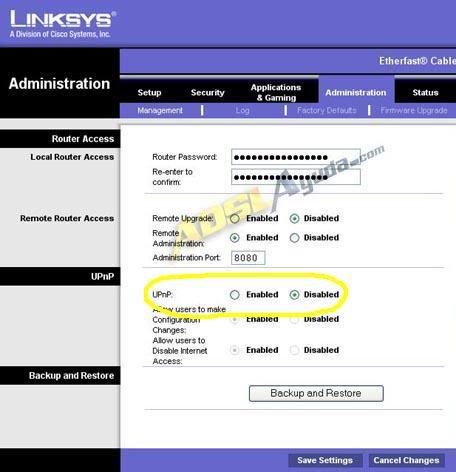
and enable it on the azureus app. tools/Options/Plugins/UPnP
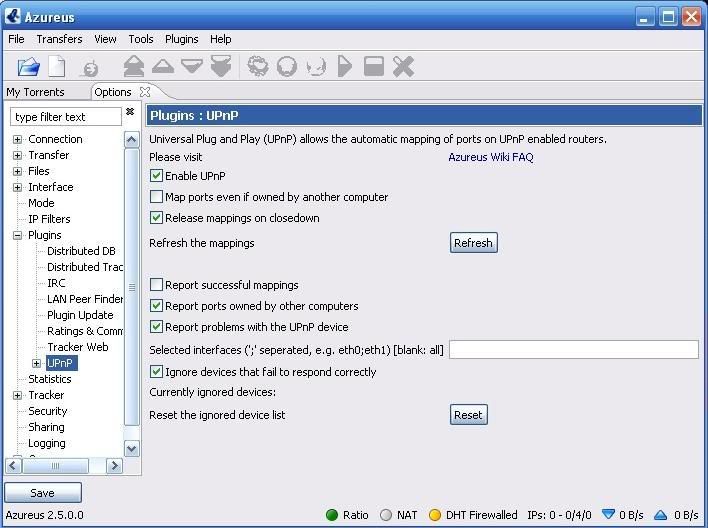
Posted: Sun Jan 07, 2007 4:48 am
by purecomedy
Disabling Tools->Options->Plugins->UPnP is what made my DHT Firewalled error go away.
Edit: Or at least it worked for about 5 minutes, now I'm back to DHT Firewalled...
Posted: Sun Jan 07, 2007 4:42 pm
by Termato
I did everything and it is still not working....Thanks for the help so far guys I appreciate it!
Posted: Tue Jan 09, 2007 8:07 pm
by YARDofSTUF
Termato wrote:I did everything and it is still not working....Thanks for the help so far guys I appreciate it!
have you tried matching the ports like Izzo said?
Start port(also called source): 65000 end port(also called destination): 65000
Izzo you should write a thread to get stickied. lol
Posted: Wed Jan 10, 2007 8:06 am
by Termato
YARDofSTUF wrote:have you tried matching the ports like Izzo said?
Start port(also called source): 65000 end port(also called destination): 65000
Izzo you should write a thread to get stickied. lol
Indeed I have only thing is that I did not use that exact port...
Posted: Wed Jan 10, 2007 11:04 am
by YARDofSTUF
Termato wrote:Indeed I have only thing is that I did not use that exact port...
I used that number as an example because earlier in the thread it was recommended to use 65000 or higher to avoid ISP throttling or something.
Posted: Wed Jan 10, 2007 12:28 pm
by Izzo
YARDofSTUF wrote:I used that number as an example because earlier in the thread it was recommended to use 65000 or higher to avoid ISP throttling or something.
Yeah, there's a wiki on the subject ....suggested port range and so on....
the only thing I can think of in his case is that he didn't forward the port for TCP and UDP ...
Posted: Wed Jan 10, 2007 12:50 pm
by YARDofSTUF
Son of a bitch!
Termato, your IP you posted "192.168.1.1"
That should be your routers IP, the IP for your PC should be like 192.168.1.100 or something, when you do ipconfig is 192.168.1.1 listed as Gateway?
Posted: Wed Jan 10, 2007 9:38 pm
by UrinalCake
Termato go to run type cmd or command and type in ipconfig/all , get the information and set up a static ip. and be sure to set all the ports u forward to the static ip you created
Posted: Wed Jan 10, 2007 9:52 pm
by UrinalCake
oops sorry i did not look up , you said you alrdy made a static ip. does your router under port forward for TCP & UDP have the 3erd setting named both, turn it off and create the number for example... start 65000 end 65000 TCP - start 65000 end 65000 UDP........ i was having a issue with that when i had just one slot set up with a port number and set to BOTH it was not reading for UDP.