Page 1 of 2
Which RAM Stick Should I get?????
Posted: Thu Dec 30, 2010 7:45 pm
by famous1681
I Currently have the Asus K52F-BBR5 Win7 Home Premium 64-bit,Intel Pentium Dual Core 2.00Ghz/core 3GB RAM DDR3(I have two Slots)
I want to make my computer faster for Video Editing,Is it neccesary to add more RAM for this Laptop???
Here is the link for the RAM's Im willing to Pay for.>
http://www.newegg.com/Product/Productcompare.aspx?Submit=ENE&N=100007635&IsNodeId=1&srchInDesc=DDR3%20PC3-10600&page=1&bop=And&ActiveSearchResult=True&CompareItemList=381%7C20-231-342%5E20-231-342-TS%2C20-148-344%5E20-148-344-TS%2C20-231-341%5E20-231-341-TS%2C20-159-028%5E20-159-028-TS%2C20-148-364%5E20-148-364-TS
Will I be fine if I get the Cheapest one out of the Bunch?
Posted: Thu Dec 30, 2010 8:23 pm
by CableDude
Don't skimp on Memory. But I guess Gskill is a good brand?
Posted: Thu Dec 30, 2010 8:46 pm
by Sava700
Consult your motherboard manual for what your supposed to have or be used in it. But if I had to choose a brand I'd go with Corsair or Gskill
Posted: Thu Dec 30, 2010 8:54 pm
by famous1681
Sava700 wrote:Consult your motherboard manual for what your supposed to have or be used in it. But if I had to choose a brand I'd go with Corsair or Gskill
I was leaning toward the G-skill.
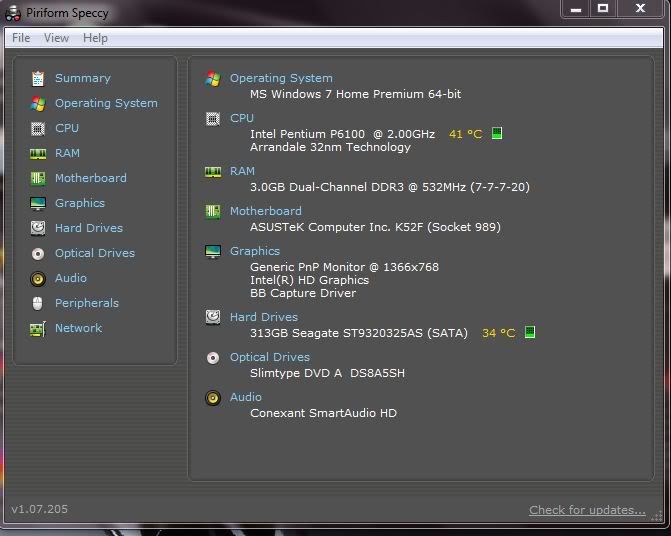
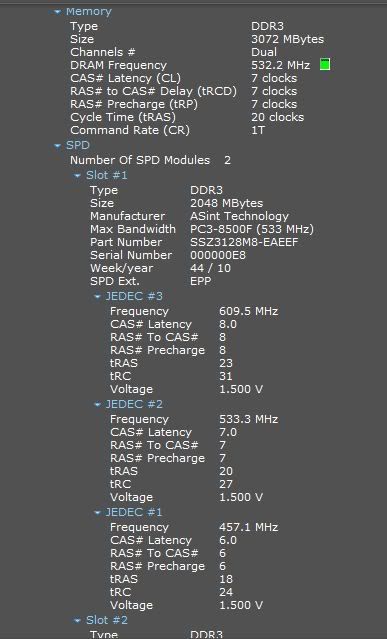
Here's the Specs I got From Speccy
Reason the Mhz on the RAM was high I shutdown the computer and just started up
Posted: Thu Dec 30, 2010 10:50 pm
by Mark
Gskill or corsair are my favorites.
going back to yo video troubles, have you or can you overclock yo CPU at all ?
Posted: Thu Dec 30, 2010 11:51 pm
by famous1681
Mark wrote:Gskill or corsair are my favorites.
going back to yo video troubles, have you or can you overclock yo CPU at all ?
Im a Noob at Overclock,I have no idea to overclock,But I have been reading a little bit and I want to do it.
Posted: Thu Dec 30, 2010 11:57 pm
by PsykoPenguin
i say go with the 8 gigs.. gskill
Posted: Thu Dec 30, 2010 11:58 pm
by famous1681
PsykoPenguin wrote:i say go with the 8 gigs..
Yeah Im going to Sell a Xbox 360 I have laying around so I can buy The RAM for my lapie
Posted: Fri Dec 31, 2010 12:04 am
by PsykoPenguin
famous1681 wrote:Yeah Im going to Sell a Xbox 360 I have laying around so I can buy The RAM for my lapie
i just got done buying the 8 gigs for my... deskie? (specs in another thread)
In any case, it's something you wont regret but are you sure your laptop will support the 8 gigs?
Posted: Fri Dec 31, 2010 12:06 am
by famous1681
PsykoPenguin wrote:i just got done buying the 8 gigs for my... deskie? (specs in another thread)
In any case, it's something you wont regret but are you sure your laptop will support the 8 gigs?
Yeah,it's 64-bit,plus Asus Website posted it will, and I have checked over at Crucial. com and they also show It supports 8GB
Posted: Fri Dec 31, 2010 12:07 am
by Mark
oh a laptop, no overclock then, get ya desktop that ya can run WFO

Posted: Fri Dec 31, 2010 12:08 am
by famous1681
PsykoPenguin wrote:i just got done buying the 8 gigs for my... deskie? (specs in another thread)
In any case, it's something you wont regret but are you sure your laptop will support the 8 gigs?
Any tricks,registry changes,allocate more memory to graphics, anything really I could do to boost more HP on my lapie, I just got into Win7
Posted: Fri Dec 31, 2010 12:10 am
by famous1681
Mark wrote:oh a laptop, no overclock then, get ya desktop that ya can run WFO
You think I could add a better processor also??? like i5 or i7...
Forget it I went to Intel Website and the prices are ridiculous!
Posted: Fri Dec 31, 2010 12:23 am
by PsykoPenguin
famous1681 wrote:You think I could add a better processor also??? like i5 or i7...
Forget it I went to Intel Website and the prices are ridiculous!
lol, bad choice for upgrading.. you gotta get a desktop if you're looking to OC and have maximum upgradeability (if that's even a word

)
Also on Windows 7, afaik there's no kind of registry tweaks to really help with ram and such. everythings usually done within the bios.
Posted: Fri Dec 31, 2010 12:25 am
by famous1681
PsykoPenguin wrote:lol, bad choice for upgrading.. you gotta get a desktop if you're looking to OC and have maximum upgradeability (if that's even a word
)
Also on Windows 7, afaik there's no kind of registry tweaks to really help with ram and such. everythings usually done within the bios.
I understand whole Concept of having a Desktop will be better but it's not a option for me....
I was looking around and If I upgrade to i3 and to 8GB of RAM should help....right........also how do I know which i3 core is for my lapie and is it just plug and play???
Posted: Fri Dec 31, 2010 12:31 am
by Mark
i would try different software before i tried to upgrade this laptop, if it were my money
Posted: Fri Dec 31, 2010 12:41 am
by PsykoPenguin
famous1681 wrote:I understand whole Concept of having a Desktop will be better but it's not a option for me....
I was looking around and If I upgrade to i3 and to 8GB of RAM should help....right........also how do I know which i3 core is for my lapie and is it just plug and play???
gotta make sure it's the same socket.. depending on the laptop you usually gotta open the entire thing just to get to the processor.
well pretty much gotta make sure every detail is correct.. though primarily the socket..
with laptops it's hard to tell what will fit and what wont since it seems they don't really give out the socket name/number for laptop processors..
though i believe that the i3 is a socket 1156...
so it is likely that the i3 wont fit your laptop and you'll have to buy a new one if you want an i3..
Posted: Fri Dec 31, 2010 12:46 am
by PsykoPenguin
Mark wrote:i would try different software before i tried to upgrade this laptop, if it were my money
well at this point and time there's not much he can do with it besides upgrading the ram to 8 gigs.. raises up the resale value in case he decides to sell it off for a newer laptop.
Posted: Fri Dec 31, 2010 12:49 am
by famous1681
PsykoPenguin wrote:gotta make sure it's the same socket.. depending on the laptop you usually gotta open the entire thing just to get to the processor.
well pretty much gotta make sure every detail is correct.. though primarily the socket..
with laptops it's hard to tell what will fit and what wont since it seems they don't really give out the socket name/number for laptop processors..
though i believe that the i3 is a socket 1156...
so it is likely that the i3 wont fit your laptop and you'll have to buy a new one if you want an i3..
Amazingly this laptop Has a cover with 6 little screws and that give me access to the RAM,Fans,and CPU,and the Hard drive.
But I have really thought it through and Im going to sell it for $400 or little bit more,as Best buy has it for $480 now and mine still looks brand new and has all the plastic stuff on it.
then I guess for few weeks I will have to deal with My HP Compaq Business dc5000 desktop and then get a i5 or i7 laptop.
What you guys think?
Or I should just get the RAM and STFU.....lol
Posted: Fri Dec 31, 2010 1:05 am
by famous1681
Mark wrote:i would try different software before i tried to upgrade this laptop, if it were my money
I have tried all different softwares, and when I use Slow-motion I have to wait for it to do its thing and it take a loooooonnnnggg time,and I have asked around Youtube commentator with better computers and I guess they dont have that problem....My guess is either not enough RAM or need a better processor....Idk guys you tell me, either way im taking Opinions to help me out.
Posted: Fri Dec 31, 2010 1:08 am
by Mark
so when you say you use slow motion, do you mean as you preview or when the video is done rendering ?
Posted: Fri Dec 31, 2010 1:09 am
by famous1681
Mark wrote:so when you say you use slow motion, do you mean as you preview or when the video is done rendering ?
Preview and I get a Exclamation mark,just few days ago I ignored it and continued and exported the file and when I viewed the movie the part where i added the slow-mo,it had some other random part of the video...
Also when I try to add enhancing effects to the video, and try to preview it lags
Posted: Fri Dec 31, 2010 1:14 am
by PsykoPenguin
well i suppose you can give the ram a shot if problem persists then sell the laptop for like 550 or something because of upgraded ram then wait along til the new laptop comes around..
Posted: Fri Dec 31, 2010 1:18 am
by famous1681
PsykoPenguin wrote:well i suppose you can give the ram a shot if problem persists then sell the laptop for like 550 or something because of upgraded ram then wait along til the new laptop comes around..
Ok, but let's say it helps, do you also think this lapie will continue for the next, lets say 4 years with the new evolving technology....??? Or Should I just sell it and get a i7?
Posted: Fri Dec 31, 2010 1:28 am
by Mark
there is no way i would run a dual core pentium PC these days, sorry but that is so old tech it makes me sad, i have a dual core AMD overclocked to 2.5 that i consider too slow for video encoding, it just sits in a closet until i can sell it.
i know this is a laptop, but video encoding takes serious CPU power or if ya have time to let it render, then be paitiant.
i am thinking maybe your disc speeds are too slow maybe, are you using just the disc on the laptop ?
Posted: Fri Dec 31, 2010 1:30 am
by famous1681
Mark wrote:there is no way i would run a dual core pentium PC these days, sorry but that is so old tech it makes me sad, i have a dual core AMD overclocked to 2.5 that i consider too slow for video encoding, it just sits in a closet until i can sell it.
i know this is a laptop, but video encoding takes serious CPU power or if ya have time to let it render, then be paitiant.
i am thinking maybe your disc speeds are too slow maybe, are you using just the disc on the laptop ?
Yeah Im using the crappy 5400RPM hard drive....even if I upgraded to 7200RPM i dont think its going to help much.....or Am i wrong?
Posted: Fri Dec 31, 2010 1:51 am
by PsykoPenguin
famous1681 wrote:Yeah Im using the crappy 5400RPM hard drive....even if I upgraded to 7200RPM i dont think its going to help much.....or Am i wrong?
You'd be surprised...
and no I don't think it'll last the ever changing technology industry...
However if I were you I'd sell it ASAP and get a newer laptop..
However for video encoding and such I'd rather much just buy a gaming laptop such as Asus Republic of Gamers G73Jh
expensive as all hell but at least it'll last a long ass time...
or get the MALIBAL Nine X7200 which is like 5x as expensive as the asus but it'd last a lifetime..
though id definitely swap out the SSD's for some disc based hdd's since space is an absolute must..
Posted: Fri Dec 31, 2010 1:56 am
by famous1681
PsykoPenguin wrote:You'd be surprised...
and no I don't think it'll last the ever changing technology industry...
However if I were you I'd sell it ASAP and get a newer laptop..
However for video encoding and such I'd rather much just buy a gaming laptop such as Asus Republic of Gamers G73Jh
expensive as all hell but at least it'll last a long ass time...
or get the MALIBAL Nine X7200 which is like 5x as expensive as the asus but it'd last a lifetime..
though id definitely swap out the SSD's for some disc based hdd's since space is an absolute must..
I found this one is it worth it?>
http://www.bestbuy.com/site/MSI+-+Laptop+/+Intel%26%23174%3B+Core%26%23153%3B+i5+Processor+/+15.6%22+Display+/+3GB+Memory+/+320GB+Hard+Drive+-+Black/1659246.p?id=1218277759922&skuId=1659246
Or this one? >
http://www.bestbuy.com/site/HP+-+Pavilion+Laptop+/+Intel%26%23174%3B+Core%26%23153%3B+i5+Processor+/+14%22+Display+/+4GB+Memory+/+500GB+Hard+Drive+-+Brushed+Aluminum/1260528.p?id=1218243761774&skuId=1260528
Posted: Fri Dec 31, 2010 2:01 am
by PsykoPenguin
eh, only expandable to 4 gigs of ram..
processors okay i guess but the max ram is lousy.
if it were me i'd pass but hey it's completely up to you what you want to do.
Posted: Fri Dec 31, 2010 2:02 am
by famous1681
PsykoPenguin wrote:eh, only expandable to 4 gigs of ram..
processors okay i guess but the max ram is lousy.
if it were me i'd pass but hey it's completely up to you what you want to do.
Oh shizzz dindt noticed that....lol
Posted: Fri Dec 31, 2010 2:14 am
by famous1681
PsykoPenguin wrote:You'd be surprised...
and no I don't think it'll last the ever changing technology industry...
However if I were you I'd sell it ASAP and get a newer laptop..
However for video encoding and such I'd rather much just buy a gaming laptop such as Asus Republic of Gamers G73Jh
expensive as all hell but at least it'll last a long ass time...
or get the MALIBAL Nine X7200 which is like 5x as expensive as the asus but it'd last a lifetime..
though id definitely swap out the SSD's for some disc based hdd's since space is an absolute must..
That MALIBAL Nine X7200 is a Beast! If i had that kind of money I would have that baby in no time.
Posted: Fri Dec 31, 2010 2:41 am
by PsykoPenguin
yeah, id probably get some kind of custom made laptop for the price of that malibal..
but yeah... the hp you pointed out is decent i guess.. just gotta upgrade the ram to 8 gigs and youre set however..
i dont know how long that'll last... though if it's well taken care of it could possibly last 4 years..
Posted: Fri Dec 31, 2010 2:45 am
by famous1681
PsykoPenguin wrote:yeah, id probably get some kind of custom made laptop for the price of that malibal..
but yeah... the hp you pointed out is decent i guess.. just gotta upgrade the ram to 8 gigs and youre set however..
i dont know how long that'll last... though if it's well taken care of it could possibly last 4 years..
Yeah that's what Id figure...My friend keeps telling me just to upgrade my lapie I have right now to 8GB and in a year or two get a new generation laptop.....what is your opinion on that?....IM Fnnn going crazy i don't know what to do!!!!

Posted: Fri Dec 31, 2010 2:54 am
by PsykoPenguin
famous1681 wrote:Yeah that's what Id figure...My friend keeps telling me just to upgrade my lapie I have right now to 8GB and in a year or two get a new generation laptop.....what is your opinion on that?....IM Fnnn going crazy i don't know what to do!!!!
I find.. 2.00 ghz to be too slow even for a dual core..
personally id say upgrade it then sell it off for like $550 while it's worth that much with 8 gigs..
then put that money towards a newer/better laptop on top of what you can spend already so you can get something better and newer..
but hey that's just me..
or you can attempt to almost break even after upgrading the ram and sell for $500.
I'm certain someone will buy it up at that price for what it has...
OR sell it off as is, still buy the ram but for a different laptop, get new laptop, replace RAM on new laptop, sell off old RAM for small sum of pocket change...
Though honestly I've seen more HP's go to hell than I've seen Dell's... seems like Dell's last a long while..
just a question... how much are you willing to spend?
Posted: Fri Dec 31, 2010 3:18 am
by famous1681
PsykoPenguin wrote:I find.. 2.00 ghz to be too slow even for a dual core..
personally id say upgrade it then sell it off for like $550 while it's worth that much with 8 gigs..
then put that money towards a newer/better laptop on top of what you can spend already so you can get something better and newer..
but hey that's just me..
or you can attempt to almost break even after upgrading the ram and sell for $500.
I'm certain someone will buy it up at that price for what it has...
OR sell it off as is, still buy the ram but for a different laptop, get new laptop, replace RAM on new laptop, sell off old RAM for small sum of pocket change...
Though honestly I've seen more HP's go to hell than I've seen Dell's... seems like Dell's last a long while..
just a question... how much are you willing to spend?
Well right now I have no job,and all i got in the bank is few hundred dollars for my internet, and when ever I get customers to fix their RROD on their xbox 360,which i get about $35 for what I do,so basically I have to sell this one and sell the spare xbox i have and I will have around $550 I guess wait until I get more money, but I willing to pay MAX $1000 including tax.
But yeah I really regret jumping onto this lapie so fast and not thinking about the specs...
Posted: Fri Dec 31, 2010 9:08 am
by Sava700
famous1681 wrote:Any tricks,registry changes,allocate more memory to graphics, anything really I could do to boost more HP on my lapie, I just got into Win7
Make sure directx is updated
Posted: Fri Dec 31, 2010 9:18 am
by CableDude
Sava700 wrote:Make sure directx is updated
Sava, my version of DX on my laptop is 10, yet I see the latest from MS is 9.29.1973.

Posted: Fri Dec 31, 2010 10:00 am
by Sava700
CableDude wrote:Sava, my version of DX on my laptop is 10, yet I see the latest from MS is 9.29.1973.
That's just the installer.. just make sure you run the web update program and see if it detects any thing missing.
Posted: Fri Dec 31, 2010 3:18 pm
by Far-N-Wide
I have heard that there is only about 3 companies in the world that make RAM chips. Testing of these chip for specific standards determines the quality and reliability. this is what drives the costs for companies that assemble the chips for name brands that you shell out the monster dollars for.
While it’s true you get what you pay for. I just make sure I can return them should they not work or pass diags that I have. I rarely pay for name brands, I do so when a customer asks for them by name.
Bottom line. What is the fastest speed and size you can afford and go with that.
My humble 2 coppers
Posted: Fri Dec 31, 2010 4:16 pm
by YARDofSTUF
I've liked G Skill for a while now. Tried them after some bad luck with Crucial Ballistix RAM and horrible customer support. The G Skill studd has worked great and one return that I had to do went very smoothly.